How to Use a ThermoPro Meat Thermometer
Insert the probe into the thickest part of the meat, past the center, and set your target temperature in the app. Wait for the alarm, confirm the reading with an instant-read check, then let the meat rest before slicing.
On this page (8 sections)
- How do you set up a ThermoPro thermometer before the first cook?
- How do you insert the probe correctly?
- How do you set a target temperature and alarm?
- How do you keep the Bluetooth connection strong?
- How do you read the temperature during the cook?
- How do you confirm doneness and rest the meat?
- How do you clean and store the probes after cooking?
- What mistakes should you avoid?
How to use a ThermoPro thermometer comes down to four moves: place the probe, set the target, keep the signal alive, and clean the probe after the cook. Do those four things and the thermometer does the rest, alarming when your meat hits the doneness you want.
The steps below work for ThermoPro's Bluetooth and wireless models. The buttons and app screens differ slightly between units, but the sequence is the same, and a few small habits separate a reliable reading from a frustrating one.
How do you set up a ThermoPro thermometer before the first cook?
Charge the unit and pair the app before you light the grill. Setup takes a few minutes and saves you from doing it with raw meat on your hands.
Charge the base and probes until the indicator shows a full battery. Download the ThermoPro app for iOS or Android and follow the pairing prompt while the base is on and within a few feet of your phone.
Open the app and let it finish any firmware update. Then check that the base and phone are still connected, since a dropped link mid-cook leaves you without alarms.
ThermoPro units are certified by NSF for food safety, so the probes are built for repeated contact with meat. Wipe each probe with warm soapy water before its first use and dry it fully.
This short setup also gives you time to read the target-temp screen and see where custom alarms live. If you'd rather start with a different brand's workflow, our walkthrough on how to use a wireless meat thermometer covers the same steps in more detail.
How do you insert the probe correctly?
Push the tip into the thickest part of the meat, past the center and away from bone or fat. That spot heats slowest, so it tells you the real doneness.
Hold the probe by its handle or cable end and slide the metal tip in sideways, not straight down from the top. Aim for the middle of the thickest section.
Keep the tip clear of bone, gristle and large fat pockets. Those conduct heat differently and can give a reading that runs hot or cold against the rest of the cut.
Don't let the tip touch the grill grate or the pan. On a whole bird, go in through the thigh rather than the breast for a safer read.
Stop when the tip sits slightly past the center of the meat, so the sensing point rests in the middle of the thickest section. If you push too far and the tip pokes out the far side, pull back a little so it sits inside the meat.
The meat thermometer temperature chart lists the target numbers for each protein, so you can set the right figure before inserting.
How do you set a target temperature and alarm?
Choose the protein and doneness in the app, or type your own target. The base and app then watch the temperature and alert you when it arrives.
Open the app's preset list and pick your meat. The built-in donenesses follow USDA-approved ranges, so pork, poultry and ground beef land at safe figures without guesswork.
For a custom cook, type the internal temperature you want. Most ThermoPro models also let you set a pre-alarm a few degrees below the target, which gives you time to open the lid or sauce the meat.
Confirm the alarm volume on the base if your model has a speaker. Then leave the app running in the background, with notifications allowed, so the alert reaches your phone when you step away.
If you monitor two pieces at once, set a separate target for each probe. A pork loin and a chicken breast on the same grill need different numbers, and one probe watching both will mislead you.
How do you keep the Bluetooth connection strong?
Keep the base within the stated range of your phone and clear of metal and walls. A steady link means the alarm actually reaches you.
Place the base on a table or shelf near the grill rather than inside a closed cabinet. Metal lids, oven doors and thick walls all cut the signal.
Keep your phone in your pocket or on a nearby counter instead of leaving it in another room. If you wander off to the mailbox or the far end of the yard, the link can drop.
On models with a long-range chip, the maker claims a reach of several hundred feet in open air. Treat that as an open-sight number, since walls and appliances shorten it in a real kitchen or patio.
If the app shows a lost connection, bring the phone closer and wait for it to reconnect. The base keeps tracking temperature during a brief drop and syncs the reading back when the link returns.
How do you read the temperature during the cook?
Watch the trend, not just the number. A steady climb tells you the cook is on track, while a flat line means the heat hasn't reached the probe's spot yet.
Glance at the app or base display every so often instead of opening the grill. Each lid opening dumps heat and slows the cook.
Near the end, the rise speeds up on thin cuts and slows on large roasts. When the reading sits within a few degrees of target, get your tongs and a resting plate ready.
If the temperature seems stuck early in a long cook, the stall is normal on big cuts like brisket. Wait it out rather than cranking the heat.
Which ThermoPro-style units suit different cooks?
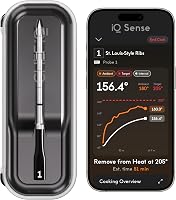
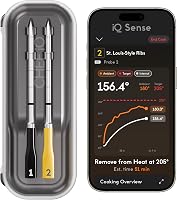
The CHEF iQ Sense 2-Probe is the strongest all-round choice for most people, because its two probes let you cook two proteins or two donenesses at once. Its hub charges both probes together and connects over WiFi, so the signal reaches your phone anywhere in the house.
The maker says each probe houses four internal sensors plus an ambient sensor, five in total, and the unit is rated to 1000°F, which covers high-heat searing and smoker duty alike.
The TempPro TempSync 650 fits cooks who want a simple Bluetooth setup without WiFi. Its maker claims up to 650 ft of range, and the base shows both probe temps in real time, so you can read the numbers without pulling out your phone.
The stated range is 14°F to 572°F with ±1.8°F accuracy.
The ThermoMaven WiFi 2-Probe suits anyone who wants a screen on the base as well as an app. Its smart base sets targets and shows live readings directly, while WiFi adds unlimited range.
The maker claims ±0.5°F accuracy and an IPX8 waterproof rating on the probes.
A dedicated bluetooth meat thermometer for smoker cooks follows the same steps, so the placement rules carry over whichever unit you choose.
How do you confirm doneness and rest the meat?
Check the reading with an instant-read thermometer in a second spot before you pull the meat. A single probe reading can sit in a cooler pocket and read low.
Slide the instant-read into another thick section, a couple of inches from the first probe. If the numbers differ by more than a few degrees, move the probe and keep cooking.
For poultry, take the reading in the thigh and the thickest part of the breast. Ground meat needs a check in the middle of the patty or loaf.
Once the target is reached, take the meat off the heat and rest it. A large roast needs 15 to 20 minutes, while steaks need about 5.
The temperature will climb a few degrees during the rest, so pull slightly early on cuts you want rare.
How do you clean and store the probes after cooking?
Wipe the metal probes with warm soapy water and dry them fully before storage. Moisture left on the plug end or cable can shorten the unit's life.
Let the probes cool completely first. Hot metal plus cold water can warp a thin probe or crack its seal.
Use a soft cloth or sponge and avoid scouring pads on the metal. Wipe the cable with a damp cloth rather than dunking the plug end.
If your model's probes are rated waterproof and dishwasher safe, follow the maker's cleaning instructions. Otherwise, hand-wash only.
The CHEF iQ probes are rated waterproof and dishwasher safe, while the TempPro unit calls for wiping clean.
Dry everything before it goes back in the box. Store the probes loosely coiled rather than kinked around a tight corner, since sharp bends damage the cable over time.
An oven safe meat thermometer with a heat-rated cable also lets you leave the probe in through a low oven cook without worrying about the wire.
What mistakes should you avoid?
The common errors are shallow insertion, a dead battery and trusting one reading. Fix those three and most thermometer problems disappear.
Pushing the tip in only an inch or two reads the surface, not the center. Always go to the middle of the thickest part.
Forgetting to charge the base leaves you without alarms mid-cook. Charge it before every long session and keep the app open.
Pulling the meat the moment the alarm sounds without a second check can leave a roast underdone in a cool spot. Confirm with an instant-read, then rest.
Leaving the probe in a hot pan or on a lit burner can damage the tip and cable. Rest the probe on a heat-safe surface between checks.
Finally, don't wash a hot probe under cold water. Let it cool, then clean it.
Following these steps, how to use a ThermoPro thermometer becomes a quick routine: insert, set, watch, confirm, rest, clean. Pick the CHEF iQ Sense 2-Probe if you want WiFi range and two wireless probes for most cooks, choose the TempPro TempSync 650 for a simple Bluetooth base with a display, and go with the ThermoMaven WiFi 2-Probe if a smart base screen matters more to you.
Frequently asked questions
How deep should the probe go into meat?
Push the probe in so the sensing tip sits past the middle of the thickest section, away from bone, fat and the grill grate. The tip needs to sit in the coolest part of the meat, because that is the last spot to reach your target temperature.
Do I need the app to use a ThermoPro thermometer?
Most ThermoPro Bluetooth models show live temperatures on the base unit and use the app for targets, alarms and history. The base works on its own for basic monitoring, but you get the most from it when the app is paired and running in the background.
Can I leave the probe in the meat the whole cook?
Yes, leave the probe in place for the full cook on long, slow cuts like brisket or pork shoulder. Pull it out only when you remove the meat to rest, and don't open the lid just to recheck the temperature.
How do I clean a ThermoPro probe?
Wipe the metal probe with warm soapy water and a soft cloth, then dry it fully before storing. Don't put the probe or its cable in the dishwasher unless the maker says it is safe, and keep the plug end dry at all times.