How Do You Use a Wireless Meat Thermometer?
To use a wireless meat thermometer, charge and pair it, insert the probe into the thickest part of the meat, then monitor its app or display. Follow the probe’s placement and heat limits, and check the food with a separate food safety guide.
On this page (7 sections)
- How do you set up a wireless meat thermometer?
- How do you place the probe in the meat?
- Can you leave a wireless probe in while cooking?
- How do you monitor temperature and set alerts?
- How do you know when the meat is safe to eat?
- How do you clean and store a wireless thermometer?
- Which wireless meat thermometer setup should you choose?
To use a wireless meat thermometer, charge and pair it, insert the probe into the thickest part of the meat, then monitor the reading on its app or display. Follow the probe’s placement and heat limits, and use a trusted food safety guide to decide when the food is ready.
Start by checking what the thermometer needs to connect. Some models pair directly with a phone, while others use a base, hub, or WiFi connection.
How do you set up a wireless meat thermometer?
Charge the probe and its base, install the companion app if needed, and follow the pairing steps for your model. Keep the probe and phone close during setup so they can connect.
Read the manual before the first cook. It explains which parts can stay near heat, whether the probe needs charging, and how to set temperature alerts.
Some thermometers also need a hub or WiFi connection for remote monitoring. For a quick overview of connection types and features, see what smart meat thermometers do.
What should you check before pairing?
Check the battery or charge level, turn on Bluetooth if the instructions require it, and allow any app permissions needed for connection. Keep the probe near the phone until the app confirms pairing.
If it won’t connect, restart the app and check whether another phone is already paired. Our guide to fixing a wireless meat thermometer that won’t connect walks through common connection problems.
The probe is rated IPX8 waterproof. Its app also supports connection with a smartphone or iPad and an Apple Watch.
How do you place the probe in the meat?
Insert the probe into the thickest part of the meat, following the placement marks or instructions for your model. Keep the tip away from bone, large fat pockets, and the cooking surface.
A correct position helps the thermometer measure the part most likely to take longest to cook. If you’re cooking multiple pieces, place a probe in each one when your thermometer supports it, or check each piece with an instant-read thermometer.
Some wireless probes have more than one sensor and measure both the meat and the surrounding cooking temperature. The probe’s sensor positions matter, so use the maker’s instructions instead of guessing which section should be buried.
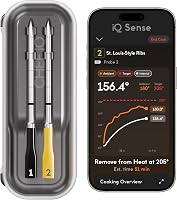
The CHEF iQ Sense 2-Probe pairs with an app and includes a hub. CHEF iQ says it offers guided cooking, flip reminders, rest timers, and WiFi monitoring.
Can you leave a wireless probe in while cooking?
Leave the probe in only if its instructions say it is made for in-cook use and your cooking temperature stays within its limits. Keep the charger, hub, and any non-heat-safe parts outside the hot cooking area.
Before closing an oven or grill, check that the probe is seated correctly and its handle is not touching a heating element, flame, or hot wall. Don’t assume a probe’s ambient-temperature limit is the same as the oven or grill’s maximum temperature.
For oven use, review whether a wireless meat thermometer can go in the oven. Probe and base rules vary by model, so the instructions for your thermometer take priority.
MEATER Plus works with the MEATER app and Guided Cook System, which provides step-by-step instructions and alerts. Its ambient sensor limit is 527°F, so follow the product’s operating guidance for your cooking setup.
How do you monitor temperature and set alerts?
Watch the thermometer’s app or display, and set an alert for the target temperature you want to check. Use the app’s estimate as a planning aid, not as a substitute for measuring the food.
A cook estimate can change as the meat heats, the lid opens, or the cooking temperature shifts. Keep the thermometer connected and check the reading before serving.
Wireless range depends on the connection, nearby walls, and the equipment between the probe and phone. Read how far a wireless meat thermometer can reach if you plan to move around the house or yard.
Its base has an LCD display, and the Typhur app can provide remote monitoring when the station is connected to 2.4GHz WiFi. Choose this setup if you want a station display alongside phone alerts.
How do you know when the meat is safe to eat?
Use a reliable food safety temperature chart for the food you’re cooking, and confirm the reading in the right part of the meat. A thermometer’s cooking preset or finish estimate does not replace safe handling guidance.
The USDA’s safe minimum internal temperature chart gives recommended temperatures and rest times for common meats. Keep raw meat separate from cooked food, and wash hands and utensils after contact with raw meat.
For a quick reference while cooking, see our meat temperature chart for wireless thermometers. Follow the thermometer’s instructions for checking a reading if you remove the probe and measure again.
How do you clean and store a wireless thermometer?
Clean the probe after each use according to its care instructions, and dry or store it as directed. Don’t submerge a charging base or hub unless the brand says it is safe.
Some probes are dishwasher-safe, while others require hand washing. MEATER’s care instructions for MEATER Plus say hand wash only, so follow those directions when cleaning it.
Recharge the probe or replace batteries before storing if your model requires it. Keeping the probe and charger together makes the next setup easier.
Which wireless meat thermometer setup should you choose?
Choose direct Bluetooth pairing for a simple local cook, or a thermometer with a hub and WiFi if you want remote monitoring beyond local range. Always confirm that the probe can handle the cooking method and temperature you plan to use.
TempPro TempSpike 500 suits cooks who want Bluetooth pairing before use. CHEF iQ Sense 2-Probe suits cooks monitoring two proteins, while MEATER Plus and Typhur Sync One Gen 2 offer a charger repeater or WiFi station.
If you’re choosing a model before your next cook, compare the basics in wireless meat thermometer buying basics. Use the instructions for your exact thermometer for pairing, probe placement, temperature limits, and cleanup.
Frequently asked questions
How do you use a wireless meat thermometer?
Charge the probe or base, pair it with its app or display, and insert the probe into the thickest part of the meat without touching bone. Set an alert if available, then monitor the reading while the food cooks.
Follow the thermometer’s instructions for probe placement, heat limits, and cleaning.
Do you leave a wireless meat thermometer in while cooking?
Many wireless probes are designed to stay in the food during cooking, but check the model’s instructions and temperature limits first. Insert it as directed and keep any charger, base, or parts that are not heat-safe outside the oven or grill.
Remove the probe carefully when cooking is complete.
Where do you put a wireless thermometer probe in meat?
Place the probe in the thickest part of the meat, aiming for the center of the section you want to measure. Avoid bone, large pockets of fat, and the cooking surface, which can distort the reading.
For thin cuts or unusual shapes, follow the thermometer maker’s placement directions.
Does a wireless meat thermometer need WiFi?
No, some wireless thermometers use Bluetooth or another local connection, while some offer WiFi for remote monitoring. Check what your model needs for pairing and alerts.
The phone and probe may need to stay within range if the thermometer does not use a WiFi-connected hub.