Meat Temperature Chart for Wireless Thermometers
A meat thermometer temperature chart gives you the safe minimum for each food, while a thermometer helps you check the thickest part. Whole cuts of beef, pork, lamb, and veal need 145°F and a 3-minute rest; ground meats need 160°F, and poultry needs 165°F.
On this page (8 sections)
- How do you use a meat thermometer temperature chart?
- How should you set up a wireless probe?
- When should you check meat with a wireless probe?
- How do you handle rest time and carryover cooking?
- What should you check when a reading seems wrong?
- What mistakes make a temperature chart less useful?
- How should you clean and store a wireless thermometer?
- Which meat thermometer temperature chart should you keep nearby?
A meat thermometer temperature chart shows safe minimum internal temperatures for meat, poultry, fish, shellfish, casseroles, and leftovers. Use it as a safety reference, check the thickest part of the food, and allow the required rest time for whole cuts.
| Food | Minimum internal temperature |
|---|---|
| Beef, pork, lamb, and veal steaks, chops, and roasts | 145°F, then rest for 3 minutes |
| Ground beef, pork, lamb, and veal | 160°F |
| Poultry, including ground poultry | 165°F |
| Fish and shellfish | 145°F |
| Casseroles and leftovers | 165°F |
These are food safety minimums, not a guide to personal doneness preferences. For more foods and handling guidance, use the USDA's safe minimum internal temperature chart.
How do you use a meat thermometer temperature chart?
Match the food to the chart, then measure its thickest area with a food thermometer. Keep the sensing tip away from bone, large fat pockets, and the pan or grill grate so the reading reflects the meat rather than a hotter surface.
For steaks, chops, and other thin cuts, insert the probe from the side so its sensing area reaches the center. For a roast, aim near the center of the thickest section.
With poultry, check the thickest part of the breast and the innermost part of the thigh and wing. If you're checking a whole bird, take readings in more than one location rather than relying on a single spot.
A wireless leave-in probe can stay in the food during cooking if its instructions allow it. Check its internal and ambient heat limits before use, and follow the directions for where the probe should sit.
If you're new to wireless probes, our guide to how to use a wireless meat thermometer explains placement, pairing, and alerts.
Does a meat thermometer temperature chart show preferred doneness?
No, it shows food safety minimums. A preference for a rarer steak doesn't change the minimum-temperature guidance for safety.
Recipes may recommend higher temperatures for texture or tenderness, especially for slow-cooked cuts. Use a reliable recipe for those goals while keeping safe handling and minimum temperatures in mind.
How should you set up a wireless probe?
Read the probe's instructions before cooking, then charge and pair it as directed. Wireless models differ in how they connect, where the hub or charger should sit, and which temperature limits apply.
For a leave-in cook, insert the probe before the food goes into the oven, grill, or smoker if the instructions call for it. Position it in the thickest area and make sure the sensing section is inside the food.
Keep the charger or hub in the position recommended for that model. A probe's wireless range and connection method affect where you can monitor the cook, so don't assume every model works the same way.
Set an alert that gives you time to check the food before serving. An estimated finish time can help you plan, but use the temperature reading and a properly placed probe to decide whether the food has reached its target.
When should you check meat with a wireless probe?
Monitor the thickest section and use the probe according to its instructions. A leave-in thermometer can reduce the need to open a lid or oven door for repeated spot checks, which is useful during a long roast or smoker cook.
The CHEF iQ Sense 2-Probe suits cooks who want to monitor two proteins or cuts at once. Each probe has four internal sensors and an ambient sensor, and the system connects through the app over Bluetooth and Wi-Fi.
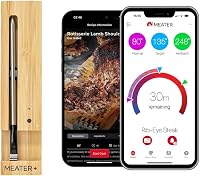
The MEATER Plus suits a cook who wants a single wireless probe with app guidance for one roast or other cut. Its dual sensors track internal and ambient temperatures, while the app provides cooking guidance, alerts, and estimated finish times.
The TempPro TempSpike 500 suits cooks who want RF connectivity alongside Bluetooth and app alerts. Its ambient temperature range reaches 572°F, and the probe is described as waterproof for cleaning.
For oven use, see whether you can put a wireless meat thermometer in the oven. Check the thermometer's stated limits before using it in a high-heat cook, and keep the hub or charger where its instructions specify.
How do you handle rest time and carryover cooking?
Follow the rest time tied to the safe minimum, then check the food before serving. USDA guidance calls for a 3-minute rest for whole cuts of beef, pork, lamb, and veal after they reach 145°F.
Food can continue to rise in temperature after it leaves the heat. The amount varies with the cut, size, and cooking method, so don't assume carryover will bring under-temperature food to a safe level.
Ground meat and poultry have different minimums. Don't use the 3-minute rest for whole cuts as a substitute for reaching 160°F for ground meat or 165°F for poultry.
What should you check when a reading seems wrong?
Check probe placement first, then take another reading in a separate thick spot if needed. A tip touching bone, sitting in a fat pocket, or missing the center may give a temperature that doesn't represent the food.
Look at the thermometer's instructions to find the sensing area and the proper insertion depth. For thin cuts, angle the probe from the side so the sensing section doesn't pass through the food.
If you use a second thermometer, clean it before checking another area. Wireless models may send readings and alerts differently, so learn what your device displays before relying on an alert during a cook.
For a closer look at app-based features and their role in cooking, see our guide to smart meat thermometers.
What mistakes make a temperature chart less useful?
The most common mistake is treating one reading as a guarantee for the whole cut. Meat can vary in thickness, so check an appropriate thick area and take additional readings where the shape or cooking method calls for them.
Another mistake is checking the wrong temperature category. Ground meat and whole cuts have different minimums, and poultry has its own target; use the row that matches the food you're cooking.
Don't confuse an estimated cook time with a safe temperature. Timing can help you plan dinner, but food reaches its target at different rates depending on its size, starting temperature, and cooking setup.
Also check whether a leave-in probe is appropriate for the heat source and cooking temperature. A thermometer's ambient limit applies to the environment around its probe, and exceeding it can lead to an inaccurate reading or damage.
How should you clean and store a wireless thermometer?
Clean the probe the way its instructions require, and return rechargeable parts to their charger after use. Care requirements vary by model, so don't assume a probe is dishwasher-safe just because another thermometer is.
The CHEF iQ Sense probes are described as waterproof and dishwasher-safe. The MEATER Plus is described as dishwasher-safe in its product information, while its care instructions specify hand washing, so follow the directions that came with the thermometer.
The TempPro TempSpike 500 has an IPX8-rated waterproof probe, which supports deeper cleaning. Keep the probe and charging components dry or protected as directed, and don't submerge parts unless the instructions allow it.
Before storing a rechargeable thermometer, make sure the probe is clean and dry. Check battery or charge status before the next long cook so a low-power alert doesn't interrupt monitoring.
Which meat thermometer temperature chart should you keep nearby?
Keep the USDA chart nearby for safety minimums, then use the thermometer's instructions for placement and heat limits. The key figures are 145°F plus a 3-minute rest for whole cuts of beef, pork, lamb, and veal, 160°F for ground meats, and 165°F for poultry.
Choose a wireless probe based on how you cook. Pick the CHEF iQ Sense 2-Probe if you regularly monitor two foods; choose MEATER Plus if app-guided monitoring of one cut fits your routine; consider TempPro TempSpike 500 if you want both RF and Bluetooth connectivity.
If most of your cooks happen in a smoker, compare our best wireless smoker thermometers. For grilling, see the guide to best wireless grill thermometers.
Use a meat thermometer temperature chart to identify the right safe minimum, then verify the thickest part with a correctly placed probe before serving.
Frequently asked questions
What temperature should meat reach on a thermometer?
The safe temperature depends on the food. USDA guidance calls for 145°F with a 3-minute rest for whole cuts of beef, pork, lamb, and veal, 160°F for ground meats, and 165°F for poultry.
Check the thickest area with a food thermometer, away from bone.
Where should a wireless meat thermometer probe go?
Place the probe in the thickest part of the meat, following its instructions and keeping the tip away from bone, large fat pockets, and the cooking surface. For thin cuts, insert it from the side so the sensing area sits in the center.
Can I leave a wireless thermometer in meat while it cooks?
Many wireless leave-in probes are designed to stay in the food during cooking, but heat limits vary by model. Check the thermometer's instructions for both the probe's internal limit and its ambient cooking limit, and position the charger or hub as directed.
Do I need to rest meat after it reaches its temperature?
Some foods need a rest for the USDA safe minimum. Whole cuts of beef, pork, lamb, and veal should rest for 3 minutes after reaching 145°F; poultry and ground meats have different minimums.
Follow recipe directions for added rest time, but don't use resting to replace a required temperature.