Can You Put a Wireless Meat Thermometer in the Oven?
Usually, a wireless meat thermometer can go in the oven when its probe is rated for oven use and the oven stays within its heat limit. Keep the base, charger, or booster outside unless its instructions say it can go in.
On this page (9 sections)
- Can you put a wireless meat thermometer in the oven?
- Which thermometer parts can go in the oven?
- How do you set up a wireless meat thermometer in the oven?
- How should you choose a wireless meat thermometer for oven cooking?
- Does an oven affect the wireless signal?
- Can you use a wireless thermometer under the broiler?
- What mistakes can damage a probe or spoil a reading?
- How do you clean and care for the probe?
- Which wireless meat thermometer should you pick for the oven?
Usually, a wireless meat thermometer can go in the oven when its probe is rated for oven use and the oven stays within its heat limit. Keep the base, charger, or booster outside unless its instructions say it can go in.
“Wireless” describes how the probe sends readings. It doesn’t mean every part belongs in the oven.
It also doesn’t mean every probe suits every cooking method. Check the model’s oven guidance, ambient heat limit, receiver setup, and probe placement before you start.
Can you put a wireless meat thermometer in the oven?
Yes, if the probe is oven-safe and the oven stays within its ambient temperature limit. Check the instructions for your specific model, since ratings and placement rules vary.
Some probes read both the food’s internal temperature and the surrounding oven temperature. These are separate readings: internal temperature tells you how hot the meat is, while the ambient reading tracks the heat around the exposed probe.
Match the ambient limit to your cooking method and planned oven setting. Don’t assume a probe rated for roasting is also suitable under a broiler or next to a heating element.
For models selected for oven use, see our guide to best oven-safe wireless meat thermometers.
Which thermometer parts can go in the oven?
Usually, only the probe goes in; the base, charger, or booster stays outside. Those components have different jobs and may have different heat limits.
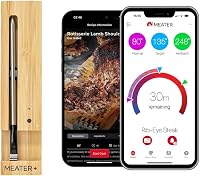
MEATER describes the MEATER Pro for oven cooking and gives it a maximum ambient temperature of 1000°F. Its app connects over Bluetooth, so it suits cooks who want readings and alerts on a phone; skip it if you want a standalone display instead.
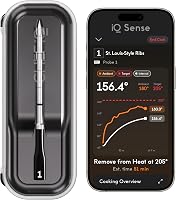
CHEF iQ describes its Sense for oven cooking and says it can withstand up to 1000°F heat. It pairs with an app and a separate Smart Hub, making it a fit for cooks who want guided recipes and remote alerts; skip it if you prefer a thermometer without an app and hub.
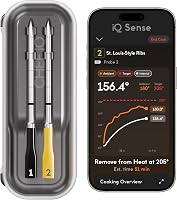
TempPro says the TempSpike probe can withstand temperatures up to 1050°F. Its two color-coded probes and LCD booster suit cooks who want to track two foods and read temperatures on a display; skip it if one probe is enough or you want WiFi monitoring.
ThermoMaven’s two probes are designed for roasting and oven cooking, and its base connects to a phone through Bluetooth or WiFi. It suits cooks who want a base display and remote monitoring; skip it if you don’t want to configure an app or network connection.
How do you set up a wireless meat thermometer in the oven?
Pair the probe and receiver before cooking, insert the probe as directed, and confirm you can see a live reading. Starting with a connection check makes it easier to catch a setup issue before the oven is hot.
- Read the model’s oven and placement instructions, then check that your planned temperature is within the probe’s ambient limit.
- Charge or prepare the probe and receiver as directed, and pair them before inserting the probe.
- Insert the probe into the thickest part of the meat, avoiding bone and large pockets of fat.
- Keep the probe’s exposed section clear of racks, walls, and pans.
- Set the base, booster, or phone outside the oven in the recommended position, then confirm the reading updates.
Follow the wireless meat thermometer use guide for more on setup and placement. To choose a target, consult the meat temperature chart for wireless thermometers and follow food-safety guidance for your cut.
How should you choose a wireless meat thermometer for oven cooking?
Choose around the cooking method, the number of foods you monitor, and how you want to see alerts. A high heat limit is useful only when it fits your actual oven use and the rest of the thermometer suits your routine.
For an oven-and-grill probe with app monitoring, MEATER Pro is the clearest fit among these options. CHEF iQ Sense adds guided cooking and a Smart Hub, while TempSpike and ThermoMaven each include two probes for cooks who want to monitor multiple foods.
Consider how you’ll check the cook. A standalone display or hub can be handy if you don’t want to keep a phone nearby.
App alerts and WiFi access help if you want to move farther from the kitchen. Check what the model requires for connection before choosing, especially if you don’t want to rely on WiFi.
Probe count matters when cooking two different cuts or checking food in separate dishes. If you cook one item at a time, a second probe may add little value.
If you often cook multiple items, color-coded probes or a two-probe system can make readings easier to tell apart.
Does an oven affect the wireless signal?
It can: oven walls, distance, and receiver placement may weaken the connection. The probe still needs to send its reading to a base, booster, or phone outside the oven.
Place the receiver where its instructions recommend, usually on a nearby counter rather than behind an appliance. Don’t put the receiver inside the oven, and avoid moving it farther away than the model’s stated range.
If readings drop, move the receiver closer and check that the probe is paired. A base or booster can have different connection steps from a probe that sends readings to a phone.
See why a wireless meat thermometer won’t connect for common fixes.
Can you use a wireless thermometer under the broiler?
Only when the model’s instructions allow broiling and the probe’s heat limit covers the conditions. Broiling exposes the food and the exposed portion of the probe to intense direct heat.
A high temperature rating alone doesn’t confirm that every placement is safe. Keep the probe away from the heating element and hot metal surfaces, and stop if the instructions rule out broiling or direct flame.
What mistakes can damage a probe or spoil a reading?
The common mistakes are exceeding the heat limit, placing the probe poorly, and assuming the receiver is oven-safe. Check each component and follow the model’s directions before cooking.
- Putting the base or charger in the oven: keep it outside unless its instructions specifically allow oven use.
- Touching a rack, pan, or oven wall: metal contact can affect placement and expose the probe to heat it wasn’t meant to take.
- Inserting too shallowly or into bone: follow the depth guidance so the sensor reads the meat where intended.
- Using the wrong cooking mode: confirm whether the model allows convection, broiling, or direct heat instead of guessing from its oven rating.
- Skipping the connection check: confirm a live reading before closing the door, and keep the receiver within range.
- Leaving a thermometer in during self-clean: don’t leave it in the oven for a self-clean cycle, which goes far beyond ordinary cooking conditions.
How do you clean and care for the probe?
Clean the probe according to its care instructions, and keep its charger or base dry and separate. Care methods vary by model, so don’t assume every component can be washed the same way.
MEATER Pro and CHEF iQ Sense probes are described as dishwasher-safe. TempSpike is listed for wipe-clean care, while ThermoMaven describes its probes as machine-washable and its base as wipe-clean.
Check the exact model directions before putting any part in water or a dishwasher.
After cleaning, dry and store the probe and receiver as directed. Avoid forcing, sharply bending, or dropping the probe, and check it before the next cook for visible damage.
Which wireless meat thermometer should you pick for the oven?
Pick MEATER Pro for Bluetooth app monitoring, CHEF iQ Sense for guided cooking with a hub, TempSpike for a two-probe display setup, or ThermoMaven for two probes with WiFi monitoring. Choose based on how you cook and how you want to follow the readings.
If you mainly roast one item and want phone alerts, MEATER Pro keeps the setup focused on a probe and app. Choose CHEF iQ Sense if its guided recipes and hub fit your routine.
TempSpike suits cooks who want a booster display and two color-coded probes; ThermoMaven fits those who want two probes plus WiFi access.
Before buying, confirm the oven rating and placement directions for the exact model. For more options, compare oven-safe wireless meat thermometers.
Frequently asked questions
Can you leave a wireless meat thermometer in the oven?
Yes, if the probe is designed for oven use and the oven temperature stays within its stated limit. Insert the probe as directed, keep the base or transmitter outside unless its instructions allow oven use, and check the probe's ambient heat limit before starting.
Can the wireless thermometer base go in the oven?
Usually, no. The probe may be made to stay in the food while cooking, but the base, booster, or charging unit is a separate part with its own limits.
Keep it outside the oven unless the instructions for that exact unit say it is oven-safe.
Can I use a wireless meat thermometer in a convection oven?
Often, yes, if its probe is rated for the oven temperature and the brand allows oven use. Convection moves hot air around the probe, so keep it clear of racks and walls and follow the stated ambient limit rather than assuming all wireless probes handle the same heat.
Why does my wireless thermometer lose connection in the oven?
Oven walls and the distance between the probe and receiver can weaken a wireless signal. Keep the receiver outside, within the stated range, and away from obstructions.
If the display still drops, check the connection instructions and whether the thermometer needs a phone, base, or booster.