Do Wireless Meat Thermometers Need WiFi?
No, wireless meat thermometers don't all need WiFi. Bluetooth and radio models can send readings locally, while WiFi models can support remote app monitoring through a network.
On this page (10 sections)
- Do wireless meat thermometers need WiFi?
- What does WiFi add to a meat thermometer?
- Can Bluetooth work without WiFi?
- Do wireless meat thermometers need WiFi if they use radio?
- Which connection should you choose?
- How do you set up a wireless meat thermometer?
- What mistakes should you avoid?
- What should you check before buying a WiFi meat thermometer?
- Do wireless meat thermometers need WiFi for your setup?
- Sources
No, wireless meat thermometers don't all need WiFi. Bluetooth and radio models can send readings locally, while WiFi models can support remote monitoring through an app.
The right connection depends on how far you want to move from the cooker and where you want to see the temperature. A wireless probe has no wire running to a display, but it still sends readings to a phone, receiver, or base.
Do wireless meat thermometers need WiFi?
No, WiFi is one of several ways a wireless thermometer can send readings. Bluetooth, radio, and Sub-1G connections can link a probe to a nearby phone or a separate receiver without using WiFi for that local connection.
The connection type and the display are separate buying questions. A Bluetooth thermometer may rely on a phone, while a radio model may include a receiver; some bases also connect to WiFi for app access.
Before choosing, decide where you want to read the temperature.
If a screen on the counter or receiver is enough, WiFi may add little to your routine. If you want app access farther from the cooker, WiFi support may be useful.
What does WiFi add to a meat thermometer?
WiFi can let you check cooking progress through an app when you're away from the probe's local connection. That suits cooks who move around the house or want to step away from the grill while keeping an eye on readings.
The probe still needs to communicate with its base or other receiving device. WiFi doesn't remove every connection limit, and remote features depend on the model's setup and network.
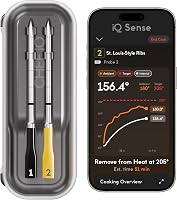
The CHEF iQ Sense 2-Probe supports WiFi and Bluetooth and connects to the CHEF iQ app. Its two probes can monitor two proteins at once, so it fits cooks who want both remote app access and separate readings for a meal.
Skip a WiFi model if you won't use remote app access or would rather avoid network setup. A local phone connection or receiver may cover your needs with fewer steps.
For more app-focused options, see smart meat thermometers and how to choose.
Can Bluetooth work without WiFi?
Yes, Bluetooth can send readings locally without a WiFi connection. It suits cooks who keep a compatible phone close enough to stay connected.
Distance and obstacles can affect Bluetooth reception. A connection that works beside the cooker may not reach another floor or the far side of a house, so think about where you'll carry your phone during a cook.
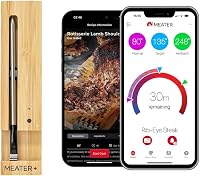
MEATER Pro connects through Bluetooth and works with the MEATER app on iOS and Android. Choose it if you want app monitoring nearby and don't need WiFi for remote access; skip it if your priority is checking readings from far away through a home network.
If you want readings without a phone, check for an included screen or receiver before buying. Our guide to using a wireless meat thermometer without a phone explains what to look for.
Do wireless meat thermometers need WiFi if they use radio?
No, a radio or Sub-1G connection can send readings to a receiver or base without WiFi for that local link. Some systems add WiFi so an app can reach the thermometer through a network.
The ThermoMaven Sub-1G Smart Base displays readings and lets you set temperatures on the base itself. It also supports app monitoring through WiFi, so it fits cooks who want a local display with an app option.
The TempPro TempSpike 1000FT 2-Probe uses RF technology and includes a display for two probes. TempPro says it can be set up without an app or sign-up, which makes it a practical choice if you want receiver-based readings and don't want to depend on a phone.
For either type, check whether the display is included and whether the app is optional or needed for the features you want. “Wireless” alone doesn't tell you how readings reach you.
Which connection should you choose?
Choose WiFi for remote app access, Bluetooth for nearby phone monitoring, or radio and Sub-1G for a receiver or base. The best fit depends on where you'll be during a cook and what screen you want to use.
- Choose WiFi if you want app access through a home network while moving away from the cooker.
- Choose Bluetooth if you plan to stay nearby with your phone.
- Choose radio or Sub-1G if you prefer readings on a separate receiver or standalone base.
- Look for a phone-free display if you don't want regular monitoring to depend on an app.
For a single cook in the kitchen, keeping a phone nearby may be simple enough. For a long cook while you're moving around, a base with remote app access or a receiver you can carry may suit you better.
Range figures depend on the model and conditions. Walls and other obstacles can weaken a signal, so compare the stated range with the route between your cooker and the place you plan to monitor from.
Read more about wireless meat thermometer range if distance is your main concern. If you haven't settled on a probe style, compare wireless and wired meat thermometers.
How do you set up a wireless meat thermometer?
Follow the model's instructions and confirm that the probe, receiver, and app are connected before cooking. A few minutes of setup near the cooker can help you spot pairing or network issues before the temperature starts to matter.
A straightforward setup usually means charging or powering the devices, pairing the probe with its base or phone, and choosing the display or alerts you want. For WiFi features, connect the base or app to the required network; for a receiver-based model, check that the receiver can pick up a reading from the cooker.
Do a quick connection check from the spot where you'll monitor. If you'll be upstairs or in another room, check the signal there before relying on remote alerts.
What mistakes should you avoid?
Don't assume that “wireless” means WiFi, long range, or phone-free use. Check the connection and display together, since those decide how you'll actually see the temperature.
Common buying and setup mistakes include:
- Buying Bluetooth when you expect to monitor from far across the home.
- Choosing WiFi without checking whether the model also needs a base or local pairing.
- Assuming a radio receiver includes app access.
- Waiting until the cook begins to charge, pair, or connect the devices.
- Ignoring walls and other obstacles when comparing range claims.
- Expecting every probe or base to be cleaned the same way.
Follow the care instructions for the exact model. The MEATER Pro, CHEF iQ Sense, and ThermoMaven probes are described as dishwasher-safe, while the TempPro display and included components have their own care needs.
What should you check before buying a WiFi meat thermometer?
Confirm the connection, display, app needs, and probe count before choosing. These details determine whether a thermometer fits your kitchen, your phone habits, and the number of foods you cook at once.
Check these points:
- Connection: Is it Bluetooth, WiFi, radio, Sub-1G, or a combination?
- Display: Will readings show on a phone, receiver, base, or more than one?
- Network needs: Does remote app access rely on a working WiFi connection?
- Phone needs: Can you use the main controls and see temperatures without an app?
- Probe count: Do you need one reading or separate readings for multiple foods?
- Range: Does the claimed range fit your home and usual cooking spot?
A WiFi model has little value if you only check a nearby screen. A receiver or standalone base may be the simpler choice for cooks who want local readings without app setup.
For other buying factors, including probe count and cooking setup, visit the buying basics guide.
Do wireless meat thermometers need WiFi for your setup?
No, choose WiFi only if you want its remote app access. Choose Bluetooth when you keep your phone nearby, or radio and Sub-1G when a receiver or base suits the way you cook.
MEATER Pro suits nearby Bluetooth app monitoring.
CHEF iQ Sense 2-Probe suits remote app access and two-protein cooks, while ThermoMaven G1 adds a standalone base with Sub-1G and WiFi options. TempPro TempSpike suits cooks who want RF readings on a display without app sign-up.
If your main concern is whether readings will reach your preferred spot, start with how far a wireless meat thermometer can reach.
Sources
- Bluetooth Special Interest Group: Bluetooth technology
- Federal Communications Commission: Radio frequency safety
Frequently asked questions
Do wireless meat thermometers need WiFi?
No. Some wireless thermometers send readings to a phone over Bluetooth or to a receiver over radio.
WiFi models can support remote app access through a network.
Check whether the thermometer needs a phone, hub, or standalone base, then match that setup to where you plan to cook.
Can a wireless meat thermometer work without internet?
Some can, depending on their connection and features. A thermometer that sends readings directly to its base or phone over radio or Bluetooth may work without internet.
Remote monitoring through WiFi usually relies on a working network.
Check the setup instructions for the model and the features you want to use.
Is WiFi or Bluetooth better for a meat thermometer?
WiFi can suit cooks who want to check readings remotely through a home network. Bluetooth can suit cooks who stay near the phone and probe.
Radio systems with a separate receiver or base are another option, especially if you want a display without keeping an app open.
Do wireless meat thermometers need a phone?
Not always. Some models use a standalone base or receiver to show temperatures, while app-connected models send readings to a phone.
Check the controls and display included with the model before you buy, especially if you want to cook without a phone nearby.