Smart Meat Thermometers: What They Do and How to Choose
A smart meat thermometer tracks food as it cooks and sends readings to a phone, base or receiver. Choose by probe count, connection, cooking method and the kind of display you want.
On this page (10 sections)
- What does a smart meat thermometer do?
- How do you choose a smart meat thermometer?
- Which smart meat thermometers suit different cooks?
- How should you set up a smart meat thermometer?
- What temperature limits and safety details matter?
- What should you do during a cook?
- What features matter most for a smoker or grill?
- How do you clean and care for a smart meat thermometer?
- What common mistakes should you avoid?
- Which smart meat thermometer should you choose?
A smart meat thermometer tracks food temperature as it cooks and sends readings to a phone, base or receiver. Choose one by how many foods you cook at once, where you cook, and how you want to see alerts.
Some models focus on app guidance and remote updates. Others put readings on a countertop base or separate receiver, which can be easier to check without opening a phone.
This guide explains the features that change the buying decision, offers examples for different cooking setups, and covers placement, setup, care and common mistakes. For probe placement and app setup, see how to use a wireless meat thermometer.
What does a smart meat thermometer do?
A smart meat thermometer measures the temperature inside food and sends that reading to another device. Many models also measure the surrounding cooking temperature and alert you as food approaches a target.
A probe stays in the food during cooking, while a transmitter, base or charger sends readings to a phone or receiver. Depending on the model, the app may show temperature history, an estimated finish time, cooking instructions or alerts.
The word “smart” does not identify one standard set of features. Check how readings reach you, where they appear, and which functions work through the app.
What makes a meat thermometer smart?
A smart meat thermometer pairs temperature readings with a digital connection or app feature. Remote alerts and guided cooking are common reasons to choose one, though not every model includes them.
A phone app can help you monitor food from another room. Some models also show readings on a base or receiver, so you can check without opening the app.
Features may include:
- Live internal food temperature
- Ambient temperature around the food
- Target temperature alerts
- Estimated finish or rest times
- Guided cooking steps or recipes
- A display on the base or receiver
Choose features that will change how you cook. An app with presets can help if you want prompts, while a clear base display matters more if you prefer fewer phone interactions.
How do you choose a smart meat thermometer?
Start with probe count, connection, temperature limits and display. These determine whether a thermometer fits your food, cooking method and kitchen habits.
| Feature | What to check | Why it matters |
|---|---|---|
| Probe count | Number of foods or zones tracked at once | Helps with multiple cuts or different target temperatures |
| Connection | Bluetooth, Wi-Fi or RF | Affects how readings reach your phone or receiver |
| Display | Phone app, base or handheld receiver | Determines where you check temperatures |
| Internal temperature limit | Maximum food temperature the probe can measure | Needs to cover the foods and cooking stages you monitor |
| Ambient temperature limit | Maximum temperature around the probe | Matters for grill, oven or smoker use |
| Alerts and guidance | Target alerts, estimates, recipes or instructions | Helps you choose the amount of app support you want |
| Cleaning | Hand wash, dishwasher or waterproof rating | Affects cleanup after cooking |
A long advertised range does not guarantee the same reach through walls or around a grill. Think about where the base will sit and how far you want to move during a cook.
For details on probe thickness, sensors and charging, see what to look for in a wireless meat thermometer.
How many probes do you need?
Choose enough probes for the number of separate foods or cooking zones you want to monitor. One probe suits a single cut, while 2 probes can track two items or two spots during one cook.
Probe count and sensor count are different. A thermometer can have several sensors inside one probe, measuring the food and surrounding cooking temperature.
Two probes help when you cook chicken beside a roast or want separate readings for two cuts. More probes can make sense for a full grill, but only if you regularly cook several items together.
One probe is simpler to position and manage when you usually cook a single large piece of meat. Compare the trade-offs in [dual-probe vs.
4-probe meat thermometers](/dual-probe-vs-4-probe-meat-thermometer/).
Which connection fits your cooking space?
Choose the connection that works where you plan to monitor food. Wi-Fi can support remote phone updates, Bluetooth suits nearby connections, and RF systems can use a separate receiver.
Bluetooth may be enough if you stay near the grill or oven. Walls and distance affect wireless signals, so check whether the model uses a base or repeater and where you need to keep it.
Wi-Fi models can connect a base to your home network, letting you check a cook from farther away through a phone. They may need a compatible network and initial setup.
RF models send readings to a dedicated receiver. That suits cooks who do not want an app, but you need to keep the receiver within range.
Consider whether you want your phone involved. Our guide explains whether wireless meat thermometers need Wi-Fi.
Should you choose an app, base or receiver?
Choose an app if you want alerts or cooking information when you step away. Choose a base or receiver if you want to read temperatures directly without opening your phone.
Some devices offer both. A base can show live readings in the kitchen while an app sends updates when you move elsewhere.
Think about who will use the thermometer and what they need to see. A receiver can be convenient when several people are cooking, while app guidance can help if you want instructions during the cook.
Check what happens if your phone loses its connection. A local display or receiver can keep readings visible when app access is inconvenient, but behavior varies by model.
Which smart meat thermometers suit different cooks?
The right model depends on how you want to monitor food. These four examples cover app guidance, a single wireless probe, a display base and a separate receiver.
CHEF iQ Sense 2-Probe: app guidance for two foods
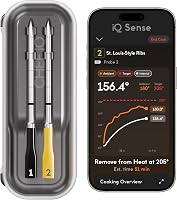
The CHEF iQ Sense 2-Probe suits cooks who want app guidance and the option to track two foods at once. It connects to the CHEF iQ app and includes a hub with audio notifications.
Each probe has four internal temperature sensors and one ambient sensor. CHEF iQ says the probes can handle up to 1,000°F, and the probes are dishwasher safe.
Choose this model if you want recipes and presets in the app along with phone notifications. Skip it if you want a simple receiver with readings that do not depend on your phone or app.
MEATER Plus: one probe with cooking guidance
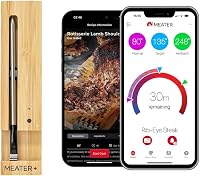
The MEATER Plus suits cooks who want a single probe and guided instructions in the MEATER app. Its charger includes a Bluetooth repeater to extend the connection.
It has dual sensors for internal food and ambient temperatures. Its internal limit is 212°F, and its ambient limit is 527°F.
Choose it for one roast, steak or other item when app alerts and estimated finish times are useful. Skip it if you regularly need separate readings for two foods, or prefer a direct display.
It is hand wash only.
ThermoMaven WiFi 2-Probe: local display and phone access
The ThermoMaven WiFi 2-Probe suits cooks who want readings on a base as well as optional app features. The base can set target temperatures and display live readings without the app.
The base connects to a 2.4 GHz Wi-Fi network for remote phone monitoring. Each probe has five internal sensors and one external sensor, and ThermoMaven states accuracy of ±0.5°F.
Choose it if you want a visible base reading alongside phone access. Skip it if you do not have a compatible 2.4 GHz network or do not want to configure Wi-Fi.
TempPro TempSpike 1000FT 2-Probe: readings without an app
The TempPro TempSpike 1000FT 2-Probe suits cooks who prefer a separate display and do not want app setup. Its RF connection sends readings to the included booster and thermometer display.
The display can show readings from both probes and two barbecue temperatures. TempPro describes the range as up to 1,000 ft, with an additional range extender available separately.
Follow the probe temperature limits carefully. The stainless steel section measures internal food temperature up to 212°F, while only the zirconia ceramic section can withstand smoker temperatures up to 1,050°F.
Choose this model if you value a receiver and straightforward setup. Skip it if you want phone alerts, app recipes or Wi-Fi monitoring while away from the receiver.
How should you set up a smart meat thermometer?
Set up the thermometer before cooking so you can confirm the probe, display and connection work together. Charge or install batteries, pair the parts as directed, then check that live readings appear before placing food in the oven or grill.
For app models, install the required app and follow its pairing steps. A Wi-Fi model may need your network name and password, and the ThermoMaven P2 requires a 2.4 GHz network for the base-to-phone connection.
For a receiver model, turn on the receiver and transmitter and confirm they show a reading. Keep the receiver where you can see it, then move to the distance you expect to use and confirm the connection remains active.
Read the probe’s placement instructions before inserting it. A display can show a number even when the probe is poorly positioned, so confirm the sensing area will sit in the part of the food you intend to monitor.
Where should you place the probe?
Place the probe in the thickest part of the food, with the sensing area surrounded by meat. Avoid bone, large pockets of fat and contact with a pan or grill grate, since those can produce a reading that does not represent the center of the food.
For a thin cut, insert the probe from the side when the instructions allow it. This helps keep the sensing area in the middle instead of letting the tip pass through the food.
For poultry, roasts and irregular cuts, position the probe where the thickest section will cook most slowly. If you use two probes, label or note which one is in each item so you do not mistake one reading for another.
How do ambient readings help?
An ambient sensor reports the temperature near the food, while the internal sensor measures the food itself. Use ambient readings to understand the cooking environment, not as a substitute for checking the food temperature.
The ambient reading can help show whether a grill or oven is heating steadily. Its location matters: a sensor close to a hot surface or flame may read differently from the cooking area around the food.
Ambient limits vary by model and by probe section. Follow the instructions for the complete probe, especially during high-heat searing or when cooking over a smoker.
What temperature limits and safety details matter?
Check both the internal probe limit and ambient limit for your cooking method. A probe that can read a high food temperature may still have a lower limit for the surrounding oven, grill or smoker.
Keep the food sensor inside the food, and do not expose parts of a probe to heat beyond their stated limits. TempPro’s stainless steel section measures internal food temperature up to 212°F, while its ceramic section is designed to withstand higher smoker temperatures.
A thermometer helps you monitor cooking, but safe serving temperatures depend on the food. Use the USDA safe minimum internal temperature chart to check the recommended temperature for each food.
For oven use, confirm that the full probe setup is suitable and follow the model instructions. See whether you can put a wireless meat thermometer in the oven.
What should you do during a cook?
Use the thermometer to monitor progress, then confirm that each probe still sits where you placed it if you move or turn the food. Treat the display as a live measurement, and make sure the reading belongs to the food you intend to check.
Flip reminders, alerts and estimates can help you plan, but they do not replace checking the temperature against the target you need. Estimated finish times can change as the food and cooking environment change.
When cooking more than one item, use a separate probe for each reading you need. If one item finishes first, remove that probe as directed and keep the remaining probe in the food still cooking.
For longer cooks, keep the charging hub or receiver in a safe, accessible spot. A dead battery or out-of-range receiver can interrupt monitoring, so check charging and battery details against the length of your planned cook.
What features matter most for a smoker or grill?
For a grill or smoker, check the ambient temperature limit, probe placement and connection. These determine whether the setup suits the heat and distance involved.
Long cooks make battery life and charging practical concerns. The CHEF iQ Sense is specified for up to 50 hours on a full charge, while ThermoMaven says its base supports 24 or more hours of use; compare those details with your usual cook length.
A second probe can track a separate cut or cooking zone. Color coding or separate app labels can also help match each reading to the right food.
Confirm that the probe can stay in place during your cooking method. Follow its stated temperature limits for direct flame, searing and ambient heat.
How do you clean and care for a smart meat thermometer?
Follow the cleaning instructions for the exact model and probe. Dishwasher-safe probes can simplify cleanup, while hand-wash-only probes need gentle cleaning by hand.
CHEF iQ says its probes are dishwasher safe, and ThermoMaven describes its probes as dishwasher safe and waterproof. MEATER Plus is hand wash only, while TempPro’s care instructions call for wiping clean.
Let the probe cool before cleaning, then remove food residue without pulling or bending it against the sensing tip. Keep the charging hub, charger and receiver away from water unless their instructions say they can get wet.
Dry the probe before storing it and return rechargeable probes to their charging hub when finished. Store the parts together so the probe, charger and display are ready for the next cook.
What common mistakes should you avoid?
The most common mistakes are choosing by range alone, ignoring temperature limits, and placing the probe incorrectly. A thermometer only helps when its setup matches the cook and its probe measures the right spot.
- Choosing more probes than you use: Extra probes add little value if you rarely cook multiple items. Start with the number of foods or zones you actually monitor.
- Assuming every “wireless” model works the same way: Wi-Fi, Bluetooth and RF have different setup and range needs. Check whether the system uses a phone, base, repeater or separate receiver.
- Mixing up internal and ambient limits: A high ambient limit does not mean the food sensor can measure that temperature. Check both limits and the specific probe section.
- Putting the tip against bone or metal: That can make a reading unrepresentative of the food’s center. Reposition the probe in the thickest part.
- Expecting range claims in every setting: Walls, distance and placement can affect the connection. Put the base or receiver where it has a clear path as much as your kitchen allows.
- Ignoring care instructions: Dishwasher-safe and hand-wash-only designs need different cleanup. Keep electronics dry unless the maker’s instructions allow water exposure.
- Relying on an estimate as the final reading: Estimated cooking time helps with planning, but use temperature readings and food-safe guidance to decide when food is ready.
Which smart meat thermometer should you choose?
Choose based on your cooking routine and where you want to see readings. Pick CHEF iQ Sense for app guidance with two probes, MEATER Plus for one guided probe, ThermoMaven for a base display plus Wi-Fi, or TempPro for an RF receiver without app setup.
If you cook one roast at a time and want step-by-step app instructions, MEATER Plus keeps the setup focused on a single probe. If you want two probes and app features, compare CHEF iQ Sense with ThermoMaven, then decide whether you prefer a hub with alerts or a base with direct readings.
If you want to cook without a phone app, TempPro’s receiver approach is the clearest fit among these options. For a wider comparison, see the best smart meat thermometers, then use how to use a wireless meat thermometer to place and set up the probe correctly.
Frequently asked questions
What does a smart meat thermometer do?
A smart meat thermometer measures food temperature during cooking and sends readings to a phone, base or receiver. Many models also track the cooking environment and offer alerts or estimated finish times.
Check whether the device needs an app, Wi-Fi or a nearby receiver to show readings.
Is a wireless meat thermometer the same as a smart thermometer?
The terms overlap, but wireless describes how readings travel, while smart often points to app features such as alerts, cooking guidance or saved history. Some wireless thermometers use a receiver and work without a phone app.
Check the connection and display to see what a model offers.
Do smart meat thermometers need Wi-Fi?
No. Some smart meat thermometers use Bluetooth or radio frequency instead of Wi-Fi.
Wi-Fi can support remote monitoring through a phone, while Bluetooth and RF range depends on the device and surroundings.
Check whether a Wi-Fi model needs a 2.4 GHz home network before you choose it.
How many probes should a smart meat thermometer have?
One probe can suit a single roast or large cut, while 2 probes help track separate foods or cooking zones at once. More probes make sense when you regularly cook several items together.
Choose for the number of temperatures you need to follow, not the maximum a model can support.
Are smart meat thermometers accurate?
Accuracy depends on the thermometer and correct probe placement. Compare stated accuracy and sensor details, insert the probe as directed, and avoid touching bone or the pan.
A wireless connection sends readings to another device, but it does not make the temperature measurement itself more accurate.