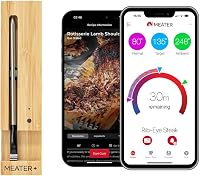
How to Charge a MEATER Block
To charge a MEATER Block, plug a Micro-USB cable into the port on the base or fit the four AA batteries, then leave the probes seated in the block so they recharge too. The block runs on battery power or USB, so you can skip the AAs for long cooks.
On this page (9 sections)
- How do you charge a MEATER Block for the first time?
- Which power source should you use, USB or AA batteries?
- How do the probes charge inside the block?
- How long does a MEATER Block take to charge?
- Why won't your MEATER Block charge or turn on?
- How do you keep the block charged between cooks?
- How does charging fit with WiFi and standalone cooking?
- What should you know before your first cook?
- The bottom line on charging your MEATER Block
To charge a MEATER Block, plug a Micro-USB cable into the port on the base or fit the four AA batteries, then leave the probes seated so they recharge in their slots. The block runs on either power source, so how you charge my MEATER Block depends on where you're cooking.
The base holds four probes and a small display, and it needs its own power before any probe can work. Getting that part right is the whole job, and the steps below cover both routes.
How do you charge a MEATER Block for the first time?
Fit the four included AA batteries or connect a Micro-USB cable, then let the probes sit in the base to top up. The MEATER Block ships with 4x AA batteries in the box, so you can start without buying anything extra.
Open the battery compartment on the underside of the bamboo base and seat all four cells the right way round. Close the cover fully; a loose cover can break contact and leave the block dead when you pick it up.
If you'd rather skip batteries, plug a Micro-USB cable into the port on the base. The cable powers the block directly and is the better choice for a long cook near an outlet.
Either way, slide each probe into its slot and push until it seats. The probes recharge in the base, so a block that's powered but empty won't get the probes ready.
The product's included components list the 4 probes, the bamboo charger, probe clips and the 4x AA batteries.
Which power source should you use, USB or AA batteries?
Use Micro-USB for cooks at home and AA batteries when there's no outlet nearby. The block accepts both, and the right one depends on how long you'll cook and where the grill sits.
The Micro-USB port lets you power the block without AA batteries, which MEATER calls out as useful for long cooks. A brisket or pork shoulder that runs most of the day is exactly the case for a cable, since you won't be swapping cells halfway through.
Batteries win when the block sits next to a smoker far from the house. There's no cord to route around hot metal or trip over, and the block still runs standalone.
For a very long smoke away from power, fresh AAs are the safe backup. The built-in 165ft WiFi repeater draws more current than Bluetooth alone, so a long session with WiFi on will drain cells faster than a short cook.
How do the probes charge inside the block?
Each probe recharges while it sits in its slot in the base, so charging the block and charging the probes happen together. Seat all four fully after every cook.
Wipe each probe clean and dry before you put it away. Moisture or baked-on grease on the contacts can stop a probe from taking a charge, and you'll only notice when it dies mid-cook.
Push the probe down until it stops. A probe that rests high in its slot may look fine but won't connect, and the app won't show it as ready.
Check the app after seating the probes to confirm each one reads a charge. If one probe keeps dropping, pull it, clean the contacts and seat it again before blaming the battery.
The probes talk to the block over Bluetooth rather than to your phone, so a charged probe still needs the block nearby. Keep the base close to the grill; WiFi doesn't extend Bluetooth range.
How long does a MEATER Block take to charge?
Give the block and probes a few hours on USB or fresh batteries before a long cook, and top up between sessions rather than waiting for a dead block. Exact times depend on how depleted the probes are.
Plan around your cook, not the clock. Charge the night before a big smoke so the block and all four probes start full, then leave the USB cable connected during the cook if you're near an outlet.
The MEATER Block needs no calibration or maintenance beyond charging, so there's no separate setup step after power. That keeps the routine simple: charge, seat the probes, open the app.
If you cook often, keep a spare set of AA batteries in the drawer. Swapping them takes seconds and saves a cook when the block won't power on.
Why won't your MEATER Block charge or turn on?
Check the cable, the USB source, the battery contacts and each probe's seating before assuming the block has failed. Most charging problems trace back to one of those four points.
Try a different Micro-USB cable and a different USB power source. Some chargers and ports deliver too little current, and a worn cable can look fine while carrying no power.
With batteries, confirm all four are fresh and facing the right way. Clean any corrosion off the contacts and make sure the compartment cover clicks shut.
Then re-seat every probe. A single probe sitting proud of its slot can stop the set from charging cleanly.
Keep the MEATER app and the block's firmware up to date. MEATER asks users to run the most recent firmware, and an out-of-date app can misreport charge status.
The app supports iOS 14 and later and Android 8.0 and later.
How do you keep the block charged between cooks?
Leave the probes in the powered base between cooks and top up the batteries every few sessions. A block that stays seated and connected is always ready when you are.
Store the base somewhere dry and away from heat. Don't leave it outdoors in the rain or beside a hot grill when it's not in use.
Check the probes every so often. If the app shows one at low charge, seat it again and give the block time on USB.
A full charge matters most for standalone mode, where you cook without your phone. Standalone mode is built for grilling and smoking with extended range, so a depleted block defeats the point.
Charge it fully before you rely on it.
How does charging fit with WiFi and standalone cooking?
Charge first, then connect, because a block running on low power may not hold its WiFi link through a long cook. The charging step and the WiFi setup are separate jobs.
Your network needs to run on 2.4GHz and stay unhidden for the block to join. LAN to WLAN multicast and broadcast must be on, and airtime fairness should be off if your router offers it.
Setup takes minutes in the MEATER app once the block has power.
With WiFi connected, the block's repeater extends range over your home network so you can monitor the cook away from the kitchen. Keep the base next to the grill, since WiFi doesn't stretch the Bluetooth link between block and probes.
When there's no network, standalone mode lets you cook without a smartphone. That's the mode to lean on at a campsite or a park, and it's the one that most rewards a full battery.
What should you know before your first cook?
Charge the block, seat all four probes and confirm each one in the app before you light the grill. That five-minute check prevents most mid-cook surprises.
The four probes let you cook different meats at different temperatures at once, so each one needs a full charge. A probe that dies at hour three leaves one cut unmonitored.
Once the block is charged and the probes are seated, the guided cook system in the app handles targets and finish times. For the full setup walkthrough, see how to use a MEATER Block.
If you're comparing models before you buy, the MEATER Plus is the single-probe option and our MEATER Plus guide covers its simpler setup. The MEATER Pro Duo adds a second probe for two-zone cooking.
The bottom line on charging your MEATER Block
To charge your MEATER Block, use the Micro-USB port for long cooks at home or fit the four AA batteries when you're away from an outlet, and always seat the probes in the base so they recharge. Keep the app current and check each probe before you cook.
Pick USB when the grill sits near power and the cook will run for hours. Pick AA batteries when you need the block standalone next to a smoker or at a campsite.
Either way, a fully charged block with all four probes seated is what makes the multi-meat cooking work.
Frequently asked questions
Can I charge a MEATER Block with a phone charger?
Yes, any Micro-USB cable and USB power source will do, as long as the cable is in good condition. Plug it into the block's Micro-USB port and the base will draw power.
The probes recharge while seated in the block.
How long do the AA batteries last in a MEATER Block?
Battery life depends on cook length and whether WiFi is running. The block's built-in WiFi repeater uses more power than Bluetooth alone, so plan to switch to USB for very long smokes.
Fresh AAs are the simplest backup for a cook away from an outlet.
Can I use the MEATER Block while it's plugged in?
Yes, the Micro-USB port powers the block during a cook, so you can leave it connected for long sessions. Run the cable clear of hot surfaces and drips.
If you move the block to the grill, keep the cable out of the way or switch to batteries.
Does the MEATER Block charge over WiFi?
No, WiFi only carries temperature data between the block and your phone. Power comes from the Micro-USB port or the four AA batteries.
Keep the cable or spare batteries on hand rather than relying on WiFi for charging.