How Do You Use a MEATER Plus?
To learn how to use MEATER Plus, charge and pair the probe, insert it into the meat, then follow the MEATER app's temperature readings and alerts. Keep the charger near the probe to support its Bluetooth repeater.
On this page (9 sections)
- How to use MEATER Plus: who should choose it?
- How do you set up MEATER Plus before cooking?
- How should you insert the probe into meat?
- What should you do in the MEATER app during a cook?
- Can you use MEATER Plus in an oven or over an open flame?
- What should you do if the connection drops?
- How do you clean and store MEATER Plus?
- Which MEATER model fits your cooking routine?
- How to use MEATER Plus: what's the simplest decision?
To learn how to use MEATER Plus, charge and pair the probe, insert it into the meat, then follow the app's temperature readings and alerts. Keep the charger near the probe so its built-in Bluetooth repeater can help maintain the connection.
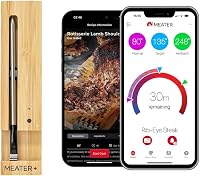
The app guides you through choosing food and a cooking target, then provides temperature readings, alerts and an estimated finish time. The probe measures both the meat's internal temperature and the cooking area's ambient temperature.
How to use MEATER Plus: who should choose it?
Choose MEATER Plus if you want one wireless probe, app-guided cooking and a charger that also extends Bluetooth range. It fits home cooks who prepare meat in a grill or oven and want to monitor the cook without staying beside the appliance.
Its dual sensors track internal meat temperature up to 212°F and ambient temperature up to 527°F. The Guided Cook System adds step-by-step instructions, real-time alerts and an estimated finish time, which can help if you want prompts while learning a new cut or cooking method.
MEATER Plus is less suitable if you need several probes to track different cuts at once, or if open-flame cooking is central to your routine. For a multi-probe setup, compare options in our guide to 4-probe wireless meat thermometers.
How do you set up MEATER Plus before cooking?
Charge the probe in its charger, pair it with the MEATER app, and confirm the app can see the probe before you start cooking. Keep your phone's Bluetooth on and follow the app's pairing steps.
Place the charger where it can stay near the probe during the cook. Its built-in repeater extends the Bluetooth range, but walls, metal surfaces and distance can still interfere, so check the connection before walking away.
If the app doesn't find the probe, make sure it is seated in the charger and follow the pairing steps again. Our guide to fixing a wireless meat thermometer that won't connect covers common connection checks.
How should you insert the probe into meat?
Insert the probe according to MEATER's instructions for the cut, then check that the app shows a sensible internal temperature. Correct placement helps the probe measure the center of the meat instead of a thinner edge or an area close to bone.
For a thin cut, inserting from the side can help more of the probe sit inside the meat. The product details don't provide a universal placement rule for every cut, so use the app guidance and MEATER's instructions for the food you're cooking.
Keep the charger outside the oven or grill. MEATER Plus is described for those cooking methods, with an ambient temperature limit of 527°F; its internal sensor measures up to 212°F.
What should you do in the MEATER app during a cook?
Select the food and cooking target in the app, then use its readings and alerts to track progress. The Guided Cook System gives step-by-step prompts and an estimated finish time.
Treat the finish time as an estimate, not a fixed timer. It can change as the cook progresses, so keep the app open or pay attention to its alerts and use the temperature readings to judge progress.
If you're new to wireless probes, the broader guide to using a wireless meat thermometer explains how app monitoring fits into a cook. For a wider view of app features, see what smart meat thermometers do.
Can you use MEATER Plus in an oven or over an open flame?
MEATER Plus is described for oven and grill cooking up to 527°F ambient temperature, but it isn't the right MEATER choice for open-flame cooking. Keep its charger outside the oven or grill and follow the appliance and thermometer instructions.
MEATER Pro is described with a 1,000°F maximum ambient temperature and is suitable for open-flame cooking. Choose it if direct flame or searing is a regular part of your routine and you want to stay within the product's stated heat range.
For more on probe heat limits and placement, read whether a wireless meat thermometer can go in the oven. The oven-safe guidance won't replace the instructions for your specific probe or appliance.
What should you do if the connection drops?
Move the charger closer to the probe and check the app connection before relying on alerts again. The charger repeater can extend range, but obstructions and distance may still interrupt communication.
Keep the charger away from the hot cooking area, and don't hide it behind thick walls or metal surfaces. If the app still can't reconnect, check the phone's Bluetooth setting and repeat the pairing steps.
A dropped connection doesn't necessarily mean the probe is damaged. Use the wireless thermometer connection troubleshooting guide for more checks.
How do you clean and store MEATER Plus?
Clean the probe after cooking and return it to the charger for storage. MEATER Plus is described as dishwasher safe, but its care information also says hand wash only.
Since those directions differ, check MEATER's current care instructions for your probe before choosing a cleaning method. If you hand wash it, dry the probe before docking it.
Avoid treating the charger like part of the probe during cleaning. Keep it out of the dishwasher and away from cooking heat, and leave the probe in its charger between cooks so it's ready for the next use.
Which MEATER model fits your cooking routine?
Pick MEATER Plus for everyday oven and grill cooks who want a charger-based Bluetooth repeater; pick MEATER Pro for open-flame cooking; consider MEATER SE if you want another app-guided wireless option. Skip Plus if you need multiple probes or regularly cook over direct flame.
MEATER SE has dual temperature sensors and is described for grill and oven use. Its app guidance makes it an option to compare if you don't need the Plus charger's repeater feature.
See the detailed comparisons for MEATER Plus vs MEATER Pro and MEATER Plus vs MEATER SE before choosing between them.
How to use MEATER Plus: what's the simplest decision?
Choose MEATER Plus if its single probe, app guidance and repeater-equipped charger match your usual cooking setup. Choose Pro if you cook over open flame, or look at SE if you want a different app-guided option; choose a multi-probe model if you need to monitor several cuts at once.
Start each cook by charging and pairing the probe, inserting it according to MEATER's instructions, and confirming the app connection. Keep the charger nearby, follow the temperature alerts, and check wireless thermometer range factors if you plan to monitor from another room.
Frequently asked questions
How do you use a MEATER Plus?
Charge the probe in its charger, pair it with the MEATER app, and insert it into the meat according to MEATER's placement instructions. Select the food and cooking target in the app, then follow the temperature readings and alerts.
Keep the charger close to the probe to support the Bluetooth connection.
Does MEATER Plus need to stay near its charger?
Keep the charger near the probe during a cook because the MEATER Plus charger has a built-in Bluetooth repeater. The repeater extends wireless range, though distance and obstructions can affect the connection.
Check the app before moving farther away.
Can you use MEATER Plus in an oven?
MEATER Plus is described for grill and oven cooking, with an ambient temperature limit of 527°F. Place the probe in the food and keep its charger outside the hot cooking space.
Follow the app and appliance instructions, and don't use the probe over an open fire.
How do you clean a MEATER Plus probe?
MEATER Plus is described as dishwasher safe, while its care information also says hand wash only. Check MEATER's current instructions for your probe before cleaning.
If hand washing, clean the probe after cooking and dry it before returning it to the charger.