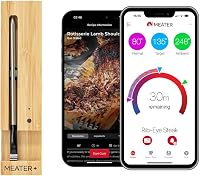
How to Use a MEATER Block
To use a MEATER Block, charge the probes in the bamboo base, pair each probe to the Block over Bluetooth, connect the Block to your 2.4GHz WiFi, then set a target in the MEATER app and monitor all four cooks. The Block runs standalone if you leave your phone indoors.
On this page (9 sections)
- How do you set up a MEATER Block for the first time?
- What WiFi settings does the MEATER Block need?
- How do the probes pair to the Block?
- How do you monitor four meats at once?
- What is Standalone Mode on the MEATER Block?
- What should you know before cooking with the Block?
- How do you clean and store the MEATER Block?
- How do you fix common MEATER Block problems?
- The short version of how to use a MEATER Block
To use a MEATER Block, charge the probes in the bamboo base, pair each one to the Block over Bluetooth, join your 2.4GHz WiFi, then set targets in the MEATER app and watch four cooks at once. Keep the base beside the grill, because the probes talk to the Block and not to your phone.
The Block is the four-probe member of the MEATER family. Setup runs through the free MEATER app and takes minutes, and after that you can monitor a brisket, two steaks and a chicken from one screen.
This guide walks through how to use a MEATER Block from first charge to pulling the meat.
How do you set up a MEATER Block for the first time?
Charge the probes fully in the bamboo base, install or plug in power, then open the MEATER app and add the Block. The app walks you through naming the unit and joining your network.
- Put all four probes in the bamboo charger and let them charge.
- Power the Block with the Micro-USB port, or fit the included AA batteries if you'd rather not use a cable.
- Open the MEATER app on iOS 14 or later, or Android 8.0 or later, and update it to the newest firmware.
- Add the MEATER Block and follow the on-screen steps to connect it to WiFi.
- Check that each probe shows as connected before you head outside.
MEATER says the Block needs no calibration or maintenance. The base is bamboo and stainless steel, so wipe it down rather than soaking it.
If you also own the single-probe model, the pairing steps differ a little; our guide to how to pair a MEATER Plus covers that unit.
What WiFi settings does the MEATER Block need?
The Block needs an unhidden 2.4GHz network with LAN to WLAN Multicast and Broadcast turned on. If your router offers Airtime Fairness, disable that too.
Most failures at this step come from the wrong band. Many routers broadcast two names, and the 5GHz one usually carries "5G" after the name while the 2.4GHz one has "2G" or no tag.
Pick the 2.4GHz name.
If your router shows only one network, it is likely dual-band and the Block will land on 2.4GHz on its own. Hidden networks and blocked multicast are the other common snags.
How do the probes pair to the Block?
Each probe pairs to the Block over Bluetooth, so the base needs to sit close to your cooker. The WiFi link from the Block to your phone does not stretch that Bluetooth hop.
Place the base on a side table beside the grill, smoker or oven rather than on the far side of the patio. The probes reach the Block directly, and distance is where disconnects start.
Wipe each probe's ceramic end dry before inserting it. Push to the depth mark on the shaft so the internal sensor sits in the thickest part of the meat.
A crowded base can also cause trouble. Set probes back in their own slots in the charger when a cook ends, so each one keeps its own charge.
How do you monitor four meats at once?
Give each probe its own meat and target in the app, then let the Guided Cook System handle the timing. Four probes mean four different doneness levels in one session.
The app asks what you're cooking and how you want it done, then shows step-by-step prompts, real-time alerts and an estimated finish time. That estimate covers both the cook and the rest.
This is the real reason to buy the Block over a single probe. A household that wants one steak medium-rare and another well done, plus chicken for the kids, can do all of it on one base and one screen.
The Block's built-in WiFi repeater reaches about 165ft, so you can watch the cook from inside the house on your own network. You aren't tied to the kitchen either way.
If you only ever cook one piece of meat, the four-probe setup is more than you need. Our look at how to use a MEATER Plus covers the simpler single-probe routine.
What is Standalone Mode on the MEATER Block?
Standalone Mode runs a cook from the Block without a smartphone. It suits long grilling and smoking sessions when you want to leave the phone indoors or your battery is low.
You set things up in the app first, then the Block keeps the cook going on its own. Range is extended compared with a phone-tethered cook, which is useful when the smoker sits at the back of the yard.
Standalone is not a replacement for the app when you want detail. Checking four probes, changing targets and reading alerts all stay easier on the screen.
MEATER Block vs MEATER Pro vs MEATER Plus
The Block is the multi-probe base, the MEATER Pro is a single wireless probe built for high heat, and the MEATER Plus is the everyday single-probe model. Pick by how many meats you cook at once.
The Block's four probes are the draw. It's the one to choose if you regularly cook more than one cut or more than one doneness level in the same session.
The Pro adds heat headroom for searing and open-flame cooking. MEATER does not recommend grilling over open fire with the Block, so the Pro is the probe to reach for when the coals get serious.
The Plus is the simplest and most popular starting point. It's the better first buy for someone who cooks one roast or one steak at a time.
What should you know before cooking with the Block?
Don't grill over an open fire with the Block, and keep the base out of the heat and splash zone. The probes are the part in the food; the bamboo base stays on the side.
The Block is designed for the kitchen, the BBQ and outdoor cooking. Its probes handle the heat at the tip, but the charger is not built to sit in flames or take a soaking.
Treat the Block as indoor and outdoor gear, not as a fire pit accessory. If you want open-flame searing, MEATER points to the Pro line with its higher ambient limit.
How do you clean and store the MEATER Block?
Wipe the probes and base, keep the probes in their slots, and charge them after each cook. A dry probe is a probe that reads right next time.
The probes are machine wash and oven safe according to MEATER, but hand washing is the safer habit for the electronics end. Dry the ceramic tip fully before it goes back in the base.
Keep the base indoors between cooks. Bamboo left in the rain will swell and split, and the electronics inside don't like moisture either.
Check the charge now and then during a long cook. A Micro-USB cable lets you top up without hunting for AA batteries.
How do you fix common MEATER Block problems?
Most problems trace to the WiFi band, the distance from base to cooker, or a stale app. Work through those three before assuming the hardware has failed.
- Probes won't connect: move the Block closer to the cooker and re-seat each probe in its slot.
- App won't find the Block: confirm the phone is on the same 2.4GHz network and the app is up to date.
- Readings stop mid-cook: check the gap between base and grill, and that no lid or wall blocks the path.
- Network drops: turn off Airtime Fairness and make sure multicast and broadcast are enabled.
For a general walkthrough of probe thermometers, see how to use a wireless meat thermometer. The habits carry over, including where to place the probe tip.
The short version of how to use a MEATER Block
To use a MEATER Block well, charge the probes, pair them to the base over Bluetooth, connect the Block to 2.4GHz WiFi, and keep the base close to the cooker. Then set each probe's meat and target in the app and let the guided cook run.
The Block earns its place when four probes save you from juggling separate thermometers. For a single roast, the MEATER Plus does the same job with less to manage.
Either way, start with the app setup done indoors, then move the base outside next to the grill. That one habit prevents most of the connection trouble people hit on the first cook.
Frequently asked questions
Do MEATER Block probes pair to the Block or to my phone?
The probes pair to the Block itself over Bluetooth, not to your phone. Your phone then talks to the Block over WiFi or Bluetooth, so keep the base close to the grill because WiFi does not extend the Bluetooth link between Block and probe.
Does the MEATER Block need AA batteries?
No, it runs from a Micro-USB port, so you can leave the batteries out for long cooks. The package also includes 4 AA batteries, and MEATER says the Block needs no calibration or maintenance.
Can I cook with the MEATER Block without my phone?
Yes. Standalone Mode runs a cook from the Block without a smartphone, which suits long grills and smokes.
The app is still the easiest place to set targets and watch four probes at once.
How many probes does the MEATER Block take?
Four. The set includes 4 probes, a bamboo charger, probe clips and 4 AA batteries.
You can cook different meats at different temperatures at the same time, so each probe gets its own target in the app.
How close should the Block sit to the grill?
Put the base right next to the grill, oven or smoker. The probes reach the Block by Bluetooth only, and the WiFi range does not stretch that link, so a distant base is where probes start dropping.