MEATER Pro Duo Review: Worth It? (October 2026)
The MEATER Pro Duo suits cooks who want to monitor two foods through the app over WiFi. Choose it if app-based guidance fits your routine; pick another thermometer if you need a built-in display or more probes.
On this page (10 sections)
- Is the MEATER Pro Duo a good fit for your cooking?
- What can you monitor with two probes?
- How do WiFi and Bluetooth work on the Pro Duo?
- What does the MEATER app add?
- How do you set up the MEATER Pro Duo?
- How should you clean and care for the probes?
- Which MEATER Pro Duo alternative should you choose?
- How does the Pro Duo compare with the MEATER Pro XL?
- What should you avoid when using the Pro Duo?
- Should you buy the MEATER Pro Duo?
The MEATER Pro Duo is a two-probe wireless thermometer for cooks who want app-based monitoring over WiFi. If you often prepare two proteins or cuts at once and want guidance and alerts on your phone, it fits that job.
Its main trade-off is simple: the Pro Duo depends on the MEATER app for full functionality and has no built-in display. Choose it when the phone-centered approach suits your kitchen; look elsewhere if you need base readings or more than two probes.
Is the MEATER Pro Duo a good fit for your cooking?
The MEATER Pro Duo suits home cooks who regularly manage two foods at once and are comfortable using a phone during the cook. The two probes can follow separate cuts or proteins, while the app provides guidance, readings and alerts.
It makes sense for meals where one food needs to come off before another, or where diners prefer different doneness levels. You can follow each probe separately instead of relying on one reading to represent both pieces.
Skip it if you want a display you can read without opening an app, or if you want the thermometer to monitor through Bluetooth alone. Also skip the two-probe format if you routinely cook several separate items at the same time.
The MEATER Pro XL has four probes and an OLED display on its charger.
MEATER Pro Duo: Best for app-first cooks

- 2 probes
- WiFi and Bluetooth
- Guided Cook System
- Dishwasher-safe probes
A two-probe thermometer for cooks who want app-based monitoring, WiFi connectivity and guided cooking. It depends on the MEATER app for full functionality.
Pros
- Monitor two foods at once
- WiFi connectivity for monitoring within home network range
- Guided Cook System with real-time alerts
- Waterproof probes can be cleaned in a dishwasher
Cons
- No built-in display
- Cannot monitor cooks solely over Bluetooth without the app
The MEATER app supports iOS 15 and later and Android 8.0 and later. Check that your phone meets those requirements and that the app is current before a cook, especially if you expect to rely on app guidance and alerts.
What can you monitor with two probes?
The two probes let you track two meats or cuts separately during one cook. That can help with a mixed meal, two different target temperatures, or multiple parts of a large cut.
Place each probe where you want to monitor the food and follow the app's insertion instructions. A reading is only useful when the probe sits in the part of the food you mean to track, so avoid placing it too close to bone or in a thin section if those aren't the areas you need to monitor.
Two probes are enough for many weeknight meals and small gatherings. If you often smoke several cuts at once, or want to follow more than two parts of a large cook, compare the trade-offs in our dual-probe vs. four-probe thermometer guide.
Think about your usual cooking pattern, not just the largest meal you might make once a year. More probes help only when you have enough separate foods or areas to monitor.
How do WiFi and Bluetooth work on the Pro Duo?
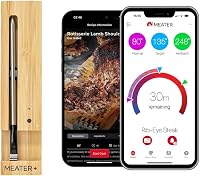
The probes connect to the base by Bluetooth, and the Pro Duo uses WiFi to pair with the MEATER app for full functionality. WiFi monitoring works within your home network range, so plan to use it where your network reaches.
Keep the bamboo charger or repeater block near the cooking appliance while the probes are in use. Put it beside the grill or oven, not on the hot appliance, and keep your phone connected to the home WiFi network for app-based monitoring.
The Pro Duo doesn't switch to Bluetooth-only app monitoring when WiFi is unavailable. If reliable monitoring away from the cooking area matters to you, check your WiFi coverage where you plan to sit or work.
Our guide to whether wireless meat thermometers need WiFi explains how connection needs vary by design.
What does the MEATER app add?
The MEATER app provides real-time readings, cooking estimates, step-by-step guidance and alerts. Those tools can help you follow a cook and plan when to start other parts of a meal.
The Advanced Estimator Algorithm estimates cooking and resting time. Use the estimate to organize your schedule, but keep checking the actual temperature because food size, starting temperature and cooking conditions can change timing.
The Guided Cook System gives instructions and alerts as the cook progresses. It can be useful if you want prompts on your phone, but it isn't necessary if you prefer to manage temperatures and timing yourself.
One common mistake is treating an estimated finish time as a guarantee. Build some flexibility into dinner plans, and use the app's readings and alerts to decide what to do as the food cooks.
How do you set up the MEATER Pro Duo?
Set up the Pro Duo before cooking so the app and WiFi connection are ready when the probes go into food. Download the MEATER app, pair the thermometer as instructed, and check that your phone's operating system is supported.
Before starting, place the charger or repeater block near the cooking appliance and confirm it can connect through your home WiFi. Make sure the app is up to date, since MEATER recommends the latest app version for current firmware releases.
Insert each probe according to the app's guidance, then select the appropriate cook and follow the readings and alerts. Avoid leaving setup until food is already cooking, when a weak connection or an app update can distract you.
For a step-by-step reference on app setup and probe placement, see how to use a MEATER Plus. The model differs, but the setup habits can help you prepare a phone-based cook.
How should you clean and care for the probes?
The Pro Duo's probes are waterproof and dishwasher-safe, so cleanup is straightforward. Wash them after each cook and dry them before returning them to the charger.
Keep the charger or repeater block dry and away from the dishwasher. Check that the probe contacts are clean before charging, since residue can interfere with charging or connection.
Don't treat the app as a substitute for basic probe care. A rushed rinse, damp contacts or a probe left dirty after cooking can cause trouble the next time you want to connect or charge it.
Which MEATER Pro Duo alternative should you choose?
The best alternative depends on what the Pro Duo lacks for your routine: more probes, a display, or a different set of app prompts. These options each solve a different buying need.
MEATER Pro XL: four probes and an OLED display
The MEATER Pro XL is for cooks who want to monitor more foods and see readings on the charger without app access. It has four probes, an OLED display and WiFi monitoring.
MEATER Pro XL: Best for big cookouts

- 4 probes
- WiFi and Bluetooth
- OLED display
- Dishwasher-safe probes
A four-probe alternative for cooks tracking more foods at once. Its OLED display shows probe data without needing app access.
Pros
- Four probes for multiple foods or sections of a large cut
- OLED display for app-free viewing
- WiFi monitoring
Cons
- More probes than needed for cooks who usually monitor two foods
Choose it for larger cookouts, several proteins or multiple sections of a large cut. If you usually need only two probes and are happy to use the app, the Pro Duo's smaller probe count is a closer fit.
ThermoMaven WiFi 2-Probe: readings on the base
The ThermoMaven WiFi 2-Probe suits cooks who want two-probe monitoring with real-time readings and target temperature controls on the base. Its app adds cooking history and AI-guided cooking.
ThermoMaven WiFi 2-Probe: Best for phone-free checks

- 2 probes
- 2.4GHz WiFi
- Smart display base
- Dishwasher-safe probes
A two-probe thermometer with readings and target temperature controls on its base. Its app adds features such as cooking history and AI-guided cooking.
Pros
- Smart base displays real-time readings
- Target temperature can be set on the base
- WiFi monitoring and Bluetooth connection to probes
Cons
- WiFi connection requires a 2.4GHz network
Its WiFi connection requires a 2.4GHz network. Choose it if you want to check readings or set a target on the base, and your home network supports that band.
CHEF iQ Sense 2-Probe: guided recipes and reminders
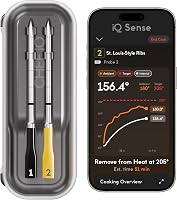
The CHEF iQ Sense 2-Probe is a two-probe alternative for cooks who want guided recipes, flip reminders and rest timers in the CHEF iQ app. It also offers estimated cooking times.
CHEF iQ Sense 2-Probe: Best for recipe prompts

- 2 probes
- WiFi and Bluetooth
- Guided Cooking recipes
- Dishwasher-safe probes
A two-probe WiFi option with guided recipes, flip reminders and rest timers in the CHEF iQ app. Choose it if those app features fit your cooking routine.
Pros
- Two probes for separate foods
- Guided Cooking recipes and reminders
- Waterproof, dishwasher-safe probes
Cons
- App-based smart cooking features require pairing with the CHEF iQ app
Pick it if those prompts fit how you cook better than the MEATER app experience. Compare the app features and display setup before choosing, since the Pro Duo has no built-in display.
How does the Pro Duo compare with the MEATER Pro XL?
The Pro Duo is the two-probe, app-focused option, while the Pro XL adds two probes and an OLED display. Both offer WiFi monitoring, so the practical choice comes down to how many foods you track and whether you want readings on the charger.
| Feature | MEATER Pro Duo | MEATER Pro XL |
|---|---|---|
| Probes | 2 | 4 |
| WiFi | Yes | Yes |
| Display on charger | No | OLED |
| App-free readings | No | Yes |
| Best fit | Two foods and app-based control | More foods or app-free viewing |
For two foods and a phone-centered routine, the Pro Duo covers the basics. Choose the Pro XL when you need more probe capacity or want to read data from its OLED display without app access.
What should you avoid when using the Pro Duo?
The most common setup mistake is starting the cook before confirming your phone, app and WiFi connection. Check these first, then place the charger near the appliance and make sure the app can connect.
Another mistake is using two probes without a clear plan for what each one tracks. Label the foods in your own notes or keep track in the app so you don't confuse readings when the cuts have different targets.
Don't rely on the estimated finish time as an exact promise. Use it to plan, then follow the temperature readings and alerts as cooking conditions change.
Should you buy the MEATER Pro Duo?
Choose the MEATER Pro Duo if you want two probes, app guidance and WiFi monitoring in a phone-centered setup. It is a good match for cooks who prepare two foods at different temperatures and don't need a display on the charger.
Choose the MEATER Pro XL if you want four probes and an OLED display, or the ThermoMaven if base readings and target controls matter more than staying in the MEATER app. For a wider comparison of app-connected options, see our best smart meat thermometers.
Frequently asked questions
Does the MEATER Pro Duo have a display?
No. The MEATER Pro Duo has no built-in display, so you use the MEATER app for full functionality.
Keep a compatible phone available during cooks.
Choose the MEATER Pro XL if you want an OLED display on the charger that shows probe data without app access.
Can you use the MEATER Pro Duo without WiFi?
The probes connect to the base by Bluetooth, but the Pro Duo uses WiFi to pair with the MEATER app for full functionality. It can't monitor cooks solely over Bluetooth without the app, so confirm your network and phone setup before you choose it.
How many foods can the MEATER Pro Duo monitor?
It comes with 2 probes, letting you monitor two meats or cuts at once. This helps when two proteins need different target temperatures or when you want to track separate sections of a large cut during one cook.
Can MEATER Pro Duo probes go in the dishwasher?
Yes. The probes are waterproof and dishwasher-safe.
Clean them after cooking and make sure they're dry before charging.
Keep the bamboo charger or repeater block out of the dishwasher.