How to Reset a ThermoPro Meat Thermometer
Turn the thermometer off, remove the batteries for about 30 seconds, then reinstall them and power it back on. That clears the stored settings and reconnects the base to its probes or app.
On this page (9 sections)
- What does resetting a ThermoPro thermometer actually do?
- How do you do a basic ThermoPro reset?
- How do you reset a wireless ThermoPro with an app or bridge?
- Why won't your ThermoPro turn back on after the reset?
- How do you reset and recalibrate the probes?
- How do you clear a frozen display or a stuck reading?
- When should you replace the batteries or the probes?
- How do you stop the same fault coming back?
- What should you do next after the reset?
Turn the thermometer off, remove the batteries for about 30 seconds, then reinstall them and power it back on. That clears stored settings and reconnects the base to its probes or app.
The battery pull is the step that works on nearly every model. It takes under a minute and does not require the manual.
Do it before you buy a replacement or assume the probe is dead.
What does resetting a ThermoPro thermometer actually do?
A reset clears the thermometer's stored state and forces it to reconnect. It wipes custom target temperatures and the pairing memory, then lets the unit start fresh when it boots.
It does not repair a damaged probe or bring back a worn-out battery. The reset only clears software glitches such as a frozen display, a reading that will not move, or a receiver that stopped pairing.
On RF units the base and receiver pair on startup. On app-connected models the bridge drops its old handshake and asks to pair again.
Either way, the electronics lose their short-term memory when the power is cut.
The USDA presets and doneness levels live in the firmware, so they survive the reset. Only the targets you entered by hand need setting again.
How do you do a basic ThermoPro reset?
Power off the unit, open the battery compartment, and lift out the batteries. Wait 20 to 30 seconds, put them back the same way, and switch on.
Follow these steps for a wired or RF ThermoPro:
- Press the power button until the display goes dark.
- Open the battery door on the back of the base or receiver.
- Take out all the batteries and set them aside.
- Wait 20 to 30 seconds so the stored state clears.
- Reinstall the batteries in the orientation shown in the bay.
- Close the door and press power; the display should light and boot.
- Unplug and reinsert each probe into its port.
The reinsert step matters. A probe that sits loosely in its socket gives an erratic reading even after a clean reset.
Push each plug in until it seats fully.
If the screen stays blank after a fresh set of batteries, the reset did not fix a hardware fault. That is the point to contact ThermoPro support rather than repeat the cycle.
How do you reset a wireless ThermoPro with an app or bridge?
Reset the base and the app side, then pair again. The order matters, because the app keeps looking for a device that has already been power-cycled.
Start with the base unit. Power it off, pull the batteries or disconnect the charging cable, wait half a minute, and power it on.
For a rechargeable unit like the TempSpike, charge it before you begin.
Then handle the app side. Open the app, remove the thermometer from your saved devices, and close the app fully.
Reopen it and run the pairing flow from the start.
Keep the base close to the bridge or router during pairing. Once it connects, walk the probe back to the grill and confirm the signal holds.
If the app still will not find the unit, restart the phone's Bluetooth next.
The {{product B0H2YYVGTM | A WiFi bridge base that pairs to its app and reconnects cleanly after a reset.}} is the kind of smart base where this app-side step applies. Its base connects over WiFi and Bluetooth, so removing the device in the app first avoids a stuck handshake.
Why won't your ThermoPro turn back on after the reset?
Check the batteries first, then the contacts, then the probe ports. Most units that fail to boot after a reset have a power problem rather than a software one.
Work through these checks:
- Battery type and charge. The TempSync uses 4 AAA batteries and ships with them included; a drained set causes a blank screen.
- Contacts and orientation. Look for corrosion or a bent spring in the bay, and match the polarity marks.
- Battery door. A door that does not latch fully breaks the circuit. Press it closed until it clicks.
- Probe sockets. Unplug all probes, power on, then add them one at a time.
- Rechargeable units. Give a rechargeable base 30 minutes on the charger before judging it. The TempSpike includes a lithium-ion battery and a USB charging cable.
If the screen lights but shows dashes or zeros, the unit is booting but not reading. That points to the probe rather than the base.
Try a second probe in the same port to separate the two.
How do you reset and recalibrate the probes?
A reset does not recalibrate a probe; you do that separately. Most units offer a calibration mode that lets you set an offset against a known temperature.
Use the ice bath for the low end and boiling water for the high end. Stir the ice bath and let the probe settle before you read it.
At sea level water boils at 212°F, and the boiling point drops as altitude rises.
Enter the offset the unit allows and save it. Then run a fresh cook to confirm the fix held.
If the probe reads flat in boiling water or wanders by more than a few degrees after a reset and calibration, replace it.
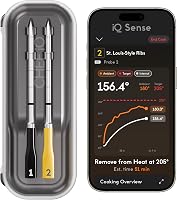
The {{product B0CRY9V6LL | Two wireless probes with ceramic ends rated to 1050 F, so a cooked probe is easy to swap.}} pairs well with a recalibration check. Keep the steel tip in the meat and let only the zirconia ceramic face the smoker heat.
How do you clear a frozen display or a stuck reading?
Power-cycle the unit and check the probe seating. A display locked on one number usually means the electronics stalled, not that the meat is that temperature.
Try this sequence:
- Power off and remove the batteries.
- Unplug every probe and inspect the plugs for grease or moisture.
- Wipe the plugs dry and let the ports air out.
- Reinstall the batteries and power on with no probes attached.
- Watch the display; it should show room temperature or dashes.
- Add one probe and confirm its reading changes when you warm the tip in your hand.
If the display responds to a warm tip, the base is fine and the original probe or its seating was the problem. If the reading stays frozen with no probe attached, the base needs a longer rest or a warranty call.
Moisture in the port is a frequent culprit after a wash. Dry the plugs fully before the next cook, and never dunk the base or the receiver in water.
When should you replace the batteries or the probes?
Replace batteries when the display dims or the signal weakens, and replace a probe when its readings stop tracking. These are the two parts that wear out on any digital thermometer.
Signs the batteries are done include a fading backlight, a receiver that drops its signal at short range, and a base that needs repeated resets. Swap the whole set at once rather than mixing old and new cells.
Signs a probe is finished include a flat reading, a reading that drifts during a cook, a cracked cable on a wired model, or a bent tip. A probe that has been through too many dishwasher cycles often fails this way.
The {{product B08KZR4F23 | Four color-coded probes and 10 USDA presets, so a reset plus a fresh set covers a whole cookout.}} shows how the preset temperatures and smart alarms do the tracking once the unit is reset. Its RF link holds up to 1,000 feet, so a weak signal after a reset is more often a battery issue than a range one.
If the reset and a battery change still leave you with odd readings, our guide to how to use a ThermoPro meat thermometer covers setup and probe placement in detail. Placement errors mimic hardware faults more often than people expect.
How do you stop the same fault coming back?
Dry the probes, store the unit out of the weather, and keep the batteries fresh. A reset fixes the symptom; these habits prevent the repeat.
Wipe each probe after use and let it dry fully before it goes back in its port. Store the base and receiver indoors, away from steam and rain.
Check the probe cables for nicks before each cook, since a small crack lets moisture in and causes drift.
For wireless units, keep the base within its rated range and away from thick walls. If you cook on a balcony or in a garage, a model with a longer link helps; our roundup of the best meat thermometers with an app covers the options that hold a connection at distance.
When you are choosing a replacement, compare the best smart meat thermometers for app alerts and probe count. And if you are still learning the controls, the wireless meat thermometer walkthrough shows how to use a wireless meat thermometer from first pair to first cook.
What should you do next after the reset?
Cook a test batch before you trust the unit with a big meal. Run the reset, recalibrate if the model allows it, and confirm the reading tracks a known temperature.
If the display, probes, and app all behave, you are done. If one part still misbehaves, replace that part rather than resetting a third time.
Reset once, recalibrate, and replace only what still fails.
Frequently asked questions
Will resetting erase my saved meat presets?
On most ThermoPro models the USDA presets and doneness levels are built into the firmware, so a reset does not delete them. Only custom targets you entered yourself clear, and you can set those again in a few button presses after the unit restarts.
Why does my ThermoPro keep losing its connection?
The usual causes are low batteries, a probe that is not fully seated, or too much distance and wall thickness between probe and receiver. Recharge or replace the batteries, push each probe firmly into its port, and move the receiver closer before you reset again.
How long should the batteries stay out during a reset?
Take them out for 20 to 30 seconds, which is long enough for the electronics to lose their stored state. Put them back in the same orientation, close the compartment, and switch the unit on; a longer wait rarely changes the result.
Can I reset a ThermoPro with a paperclip button?
Some models have a small recessed reset button, often on the back or inside the battery bay. If yours does, press it once with a straightened paperclip while the unit is on, then power it off and on again to finish the cycle.
When should I replace the probes instead of resetting?
Replace a probe when its reading stays flat in boiling water or drifts far from a known temperature after a fresh battery reset. A cracked cable or a bent tip near the ceramic end also points to replacement rather than a reset.
Is it safe to cook while the thermometer is resetting?
No, wait until the unit is reading correctly before you rely on it. Use a separate instant-read check in the meantime and keep raw meat out of the danger zone; a thermometer you cannot trust is worse than no reading at all.