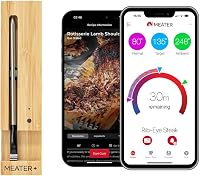
How to Charge a MEATER Plus
To charge a MEATER Plus, seat the probe in its bamboo charger and keep the charger powered with its AAA battery or USB connection. The app shows the charge level, so leave the probe in until it reads full before you start cooking.
On this page (8 sections)
- Where does a MEATER Plus get its power?
- How do you charge a MEATER Plus step by step?
- How long does a MEATER Plus take to charge?
- Why is your MEATER Plus not charging?
- Does the MEATER Plus Thermometer charge the same way?
- How should you store and care for the charger?
- Do both MEATER Plus models charge the same way?
- How do you get the longest life from a MEATER Plus charge?
To charge a MEATER Plus, seat the probe in its bamboo charger and keep the charger powered, then watch the MEATER app until the battery reads full. The probe has no cable or plug of its own, so the charger is the whole charging setup.
Getting this right means you start every cook with a live probe instead of a flat one.
That is the short version. The rest of this guide covers where the power comes from, how long a top-up takes, what to do when the app shows no charge, and how the process differs between the two MEATER Plus versions.
Once you know how to charge MEATER Plus properly, the routine takes less than a minute.
Where does a MEATER Plus get its power?
The MEATER Plus charges through its bamboo charger, which holds one AAA battery that comes in the box. The charger also acts as a Bluetooth repeater that extends the wireless range, so it does two jobs at once.
The probe is 100 percent wire-free. That means there is no charging port on the probe itself and no cable to connect.
Power passes through the charger's contact points into the probe while it sits seated.
MEATER rates the setup for 2 hours of cook time on just a 5-minute charge. That short window is the key number for a quick top-up between meals.
Leave the probe seated longer and the app will show the charge climbing toward full.
The charger's job as a repeater matters too. Keep it powered and in range of your phone, and the MEATER Plus holds a longer wireless link to the app while you cook.
A dead battery in the charger affects both charging and range.
How do you charge a MEATER Plus step by step?
Seat the probe fully, power the charger, and confirm the battery reading in the app before you start a cook. The sequence is short, but each step matters.
- Take the probe out of the meat and let it cool if you just finished a cook.
- Wipe the probe clean and dry, following the care instructions.
- Set the probe straight down into the bamboo charger until it sits flush.
- Check that the AAA battery is in place and the charger is not sitting in water or direct heat.
- Open the MEATER app and read the probe's charge level.
- Leave it seated until the reading shows full, then insert the probe into the food.
The seat is the step people get wrong. A probe that sits at an angle or rests on a bit of food residue can fail to make contact.
Push it down gently and evenly, and you should feel it settle.
If you have not paired the probe to your phone yet, do that first. Our guide to how to pair a MEATER Plus walks through the Bluetooth steps so the app can read the charge.
How long does a MEATER Plus take to charge?
A 5-minute charge gives about 2 hours of cook time, according to MEATER. That is the number to plan around for a steak, a burger session or a quick chicken breast.
For a longer cook, such as a turkey or a slow roast, leave the probe seated longer so the charge is closer to full. The app's battery reading tells you when it is ready.
You do not need to guess from a light or a timer.
The probe's dual sensors measure internal meat temperature up to 212°F and ambient temperature up to 527°F. None of that changes the charging routine, but it explains why the probe needs a solid charge before a long, hot cook.
A weak charge in the middle of a roast leaves you without readings.
Treat the 5-minute figure as a minimum, not a target. A short top-up is fine for a quick grill, and a longer seat is better when the cook will run for hours.
That is the practical way to think about charging time.
Why is your MEATER Plus not charging?
The usual causes are a flat AAA battery, a probe that is not seated flush, or dirty contact surfaces. Work through those three before assuming the probe has failed.
Start with the battery. The charger runs on one AAA cell, and a weak battery cannot pass a charge to the probe.
Swap in a fresh battery and seat the probe again.
Next, check the seat. Pull the probe out, wipe the base and the charger's contact area, and push it back down evenly.
Food residue and moisture both get in the way of a good connection.
Then check the app. If the app shows no battery reading at all, the probe may not be paired or may be out of Bluetooth range.
Move the charger closer to your phone and try again.
If none of that works, contact MEATER support. Do not open the probe or the charger to look inside, because that is not part of the normal care routine.
Does the MEATER Plus Thermometer charge the same way?
Yes. The MEATER Plus Thermometer, the engraved King of the Grill version, uses the same bamboo charger and the same AAA battery setup.
You seat the probe in the wooden charger and let it charge.
The difference is the rated charge life. This version's wooden charger is rated for up to 24 hours of continuous cooking on a single charge.
That longer window suits people who smoke or roast for most of a day.
It also keeps the Bluetooth repeater inside the charger, extending wireless range up to 165 feet. Keep that charger powered and in range, and your phone stays connected while you move around the house.
The dual sensors work the same way, reading internal meat temperature up to 212°F and ambient temperature up to 527°F. Charging does not change between the two models, so the routine you learn on one works on the other.
How should you store and care for the charger?
Keep the probe seated in the charger between cooks and keep the charger dry. That habit means the probe is always topped up and ready.
Store the charger indoors, away from the grill, the oven and any wet surface. Heat and moisture are the two things that shorten a charger's life.
Wipe any splashes off straight away.
Replace the AAA battery when the charge stops holding. A fresh cell is cheap insurance against a flat probe on a cook day.
Keep a spare in the drawer if you cook often.
The probe cleans up easily with a wipe down by hand, following the care instructions. Let it dry fully before you seat it back in the charger, because moisture on the contacts is one cause of a weak charge.
Do both MEATER Plus models charge the same way?
Both models charge through a bamboo charger with one AAA battery, so the steps are identical. The MEATER Plus charger is rated for 2 hours of cook time from a 5-minute charge.
The MEATER Plus Thermometer's wooden charger is rated for up to 24 hours on a single charge.
The engraved version costs more and suits a gift buyer. If you are choosing between the two, our comparison of MEATER Plus vs MEATER SE covers how the range and price tiers differ.
Our full MEATER Plus review goes deeper on how the probe performs in everyday cooking.
How do you get the longest life from a MEATER Plus charge?
Seat the probe fully, keep the charger out of heat and moisture, and replace the AAA battery when charging slows. Those three habits cover most of what shortens a charge.
Charge before each cook rather than relying on the last session. A 5-minute top-up is easy to fit in while the grill heats.
For a long smoke, give the probe more time in the charger first.
Keep the charger near your phone so the repeater holds the wireless link. A weak link drains nothing, but it does cut the readings you get from the app during a cook.
When you are ready to cook, our guide to how to use a MEATER Plus covers inserting the probe and reading the app. Learning how to charge a MEATER Plus correctly is the step that makes the rest of the cook go smoothly.
Keep the probe in its charger between sessions, and you will rarely start a cook with a flat battery.
Frequently asked questions
Can you charge a MEATER Plus in the dishwasher?
No. Wash the probe as the care instructions allow, but never run it through a dishwasher cycle, because the heat and water are not part of the charging or cleaning routine.
Dry the probe fully, then put it back in the bamboo charger to top it up.
Does the MEATER Plus charger need a wall outlet?
Not always. The bamboo charger runs on one AAA battery, which comes in the box.
Charging works from the charger's own power, so you do not have to plug the probe into anything.
How do you know the MEATER Plus is fully charged?
Open the MEATER app and look at the battery reading for the probe. The app reports the charge level, so you can leave the probe seated until it shows full.
Unseat it only when you are ready to insert it into the meat.
Can you leave the MEATER Plus in its charger all the time?
Yes. The bamboo charger is designed to store and protect the probe, so keeping the probe seated between cooks is normal.
Replace the AAA battery when the charge stops holding, and keep the charger away from heat and moisture while it rests.