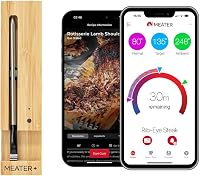
How to Use My MEATER Block in Standalone Mode
Press the Block's power button to wake the base, then use its control dial to choose a target temperature for each probe. The Block cooks and tracks temps on its own without your phone, so standalone mode works when you want to grill or smoke without tying up a device.
On this page (9 sections)
- What does standalone mode actually do on a MEATER Block?
- How do you set up the Block for a standalone cook?
- How do you set a target temperature on the Block?
- Where should the Block sit while you cook?
- When should you skip standalone mode and use the app?
- How do you read the cook without a phone?
- Which MEATER models run without a phone?
- How do you go back to the app after a standalone cook?
- The bottom line on standalone mode
Here's how to use your MEATER Block in standalone mode: wake the base, set a target temperature for each probe on the Block itself, and let it track the cook without your phone. The probes pair to the Block over Bluetooth, so the base does the monitoring and alerts while your phone stays in your pocket or on the counter.
Standalone mode exists for the cooks where you don't want a device in the mix, like a long brisket on the smoker or a Sunday roast. This guide walks through how to use my MEATER Block in standalone mode from setup to the finish, plus when to switch back to the app.
What does standalone mode actually do on a MEATER Block?
Standalone mode runs the cook on the Block base itself, without the MEATER app. You set a target temperature on the base for each probe, and the Block tracks internal and ambient readings and alerts you when a probe reaches its target.
The key point is where the work happens. In normal app mode, the Block bridges to your phone or WiFi network and the app shows the cook, the estimator and the alerts.
In standalone mode, the base handles the tracking and the temperature targets on its own.
That makes standalone mode the better fit for a few situations. A long cook where you'd rather not keep a phone charged and nearby.
A smoker session in the yard where you want to walk away from screens. Or a cook where the WiFi at the grill is weak and you just want a simple target temperature.
How do you set up the Block for a standalone cook?
Charge the Block and probes, pair the probes to the base, then set your targets on the Block. Do this once and standalone mode is quick to repeat.
The Block's Micro-USB port keeps it powered without needing batteries. For a long cook, the Micro-USB port is the practical choice, since it removes any worry about battery life halfway through a brisket.
The maker says no calibration or maintenance is required.
Pairing happens between the probes and the Block over Bluetooth, not through your phone. The Block has to sit close to the grill, oven or smoker, because WiFi does not extend Bluetooth range.
If the base is too far from the cooker, probes can drop the connection. Set it next to the cooker, not across the yard.
Place each probe in the meat, keeping the ambient end clear of the grate. Then set each probe's target temperature on the Block.
If you're new to wireless probes in general, our walkthrough on how to use a wireless meat thermometer covers probe placement and target temps.
How do you set a target temperature on the Block?
Use the Block's controls to move each probe to its target temp, then confirm. The base lets you set targets for the four probes one at a time.
Start with the probe you're cooking first. Nudge the target up or down to the doneness you want, then confirm so the Block starts tracking that probe.
Repeat for each probe in use. Because the Block has four probes, you can run different meats and different targets at once, like a steak to medium-rare and chicken to a higher internal temp.
Keep in mind what standalone mode doesn't do. The app's Guided Cook System and its finish-time estimator run through the app, so a standalone cook won't show those step-by-step prompts.
You're choosing the target and the Block is watching for it. For app-driven cooks, see how to use a MEATER Block in the full app setup.
Where should the Block sit while you cook?
Keep the Block next to the cooker and within its WiFi network if you also want app monitoring. Standalone mode doesn't need WiFi, but the base still needs a short Bluetooth path to the probes.
The Block's built-in 165ft WiFi repeater extends range over your home network, which matters when you monitor through the app. Setup takes minutes through the MEATER app.
The network has to be on the 2.4GHz band and unhidden, with LAN to WLAN Multicast and Broadcast enabled. If the router supports Airtime Fairness, turn it off.
The maker lists iOS 14 and later and Android 8.0 and later, and asks that you keep the app updated with the most recent firmware releases. For a standalone cook, none of that is needed during the cook, but the firmware keeps the base current between sessions.
One thing to know: MEATER does not recommend grilling over an open fire with the Block. Higher ambient limits are the reason the MEATER Pro line exists.
When should you skip standalone mode and use the app?
Use the app when you want guided cooks, finish-time estimates and phone alerts. Standalone mode trades those features for a simple target on the base.
The app gives step-by-step instructions per cook, real-time alerts and estimated finish times. That matters for a first brisket or a turkey where timing decides whether dinner lands on schedule.
The Block's four probes still work in the app, and the estimator helps you plan the rest of the meal.
The app also matters when you want to monitor from elsewhere in the house over WiFi. Standalone mode keeps the tracking on the base and alerts you at the base, so it suits the cook who wants to stay near the grill.
If your main concern is cooking without a phone at all, our guide to a wireless meat thermometer no phone needed covers which units run on their own. That's the same reason standalone mode is useful here.
How do you read the cook without a phone?
Watch the Block's display and its alerts for each probe, and check the meat when a target is reached. Standalone mode keeps the essentials on the base, so you can run the whole cook from there.
Treat each target as a checkpoint, not a finish line. When a probe hits its target, pull the meat and let it rest before slicing.
The Block's four probes let you stagger cooks, so a quick chicken breast can come off while a pork shoulder keeps going.
Keep the Block's screen or indicators in view from where you sit. If you wander too far from the base, you lose the benefit of the alerts.
That's the trade-off for leaving the phone behind.
Which MEATER models run without a phone?
The Block is the model built for standalone cooking, and the rest of the line is app-first. The MEATER Pro is a single fully wireless probe that monitors through Bluetooth and the app.
The MEATER Pro Duo pairs two probes and uses built-in WiFi to monitor from the app, and the maker notes it has no built-in display and cannot monitor cooks solely over Bluetooth without the app.
If you want a base that displays and runs a cook on its own, the Block is the one to get. If you're weighing which model fits your setup, read how to use MEATER Plus for the single-probe option and its app workflow.
How do you go back to the app after a standalone cook?
Open the MEATER app and let it reconnect to the Block, then review or plan the next cook. Standalone mode doesn't lock you out of the app.
The Block still bridges to your WiFi network when you want app monitoring. Make sure the app and firmware are current, and keep the base near the cooker so the probes stay paired.
From there, the Guided Cook System, alerts and finish-time estimates are available again.
Going back to standalone is just as simple: set targets on the base and cook without the app. The two modes fit different sessions, so you can switch based on the cook and whether you want your phone in the loop.
The bottom line on standalone mode
To use my MEATER Block in standalone mode, charge the base, pair the probes to the Block over Bluetooth, set a target for each probe on the base, and keep the Block next to the cooker. Leave your phone behind and let the Block run the cook.
Pick standalone mode for long smoker sessions and simple target temps. Go back to the app when you want guided cooks, finish-time estimates and phone alerts.
Either way, keep the Block close to the grill so the Bluetooth link holds. For app-driven cooks on the same base, see how to use a MEATER Block, and for single-probe setups, read how to use MEATER Plus.
Frequently asked questions
Can I cook with the MEATER Block without a phone?
Yes. Standalone mode lets the Block run a cook on its own, so you set a target temperature on the base and watch its display instead of your phone.
Does standalone mode need WiFi?
No. Standalone mode is a local function of the base.
The built-in WiFi repeater only matters when you want to monitor from the app across your home network.
How many probes work in standalone mode?
The Block pairs with its four probes directly over Bluetooth, so you can run up to four at once. Each one tracks its own target temperature without the app.
What happens to the MEATER app while I cook in standalone mode?
The app is not required during the cook. When you are done, you can review the finished cook in the app, but standalone mode does not push alerts to your phone.