What to Look for in a Wireless Meat Thermometer
What to look for in a wireless meat thermometer starts with its connection, probe count, heat limits and battery life. Match those features to your cooker, the number of foods you prepare, and how far you need to monitor from.
On this page (9 sections)
- What should you look for in a wireless meat thermometer?
- Does Bluetooth, RF or WiFi fit your cooking setup?
- How many probes do you need?
- Which temperature limits matter for your cooker?
- How long should the battery last?
- Do you want a screen, an app or both?
- What should you check about setup and cleaning?
- Which wireless meat thermometer fits your priorities?
- What to look for in a wireless meat thermometer before you buy
What to look for in a wireless meat thermometer starts with the connection, probe count, heat limits and battery life. Match those features to your cooker, how many foods you monitor, and where you want to stand while dinner cooks.
A wireless thermometer can give you more freedom around a grill, oven or smoker, but the connection and controls vary. If you want a broader overview first, read our guide to smart meat thermometers.
Here, the goal is to match a thermometer to your actual cooking routine.
What should you look for in a wireless meat thermometer?
Look for a connection that works at your usual distance, enough probes for your meals, and heat limits that suit your cooking method. Then check how you’ll read alerts, charge the probes and clean them.
| What to compare | Why it matters |
|---|---|
| Connection type and range | Determines where you can check readings from |
| Probe count | Sets how many foods or cooker locations you can monitor |
| Internal and ambient limits | Helps match the probe to the food and cooking method |
| Battery and charging | Affects long cooks and how soon you can use the thermometer again |
| Display and app controls | Determines whether you can manage a cook without relying only on your phone |
| Setup and cleaning | Shows what you’ll need to do before and after each cook |
Start with the constraint that matters most. If you smoke meat for hours, battery life and connection stability deserve priority; if you often cook two different foods, probe count may matter more.
How to choose a wireless meat thermometer for your cooking
Choose by listing your usual cooker, the longest cook you make, the number of foods you monitor, and where you want to check readings. That short list narrows the options before app extras or extra sensors enter the picture.
For example, a backyard grill cook who stays nearby may not need WiFi. A long smoker cook with a distant seating area may benefit from remote monitoring, while a cook who avoids phone use may prefer a base with a display and direct controls.
Does Bluetooth, RF or WiFi fit your cooking setup?
Choose a connection based on where you need to see the temperature while cooking. Bluetooth and RF use a local wireless link, while WiFi models can relay readings through a home network.
Bluetooth can suit cooks who remain close to the grill or use a base that bridges the probe and phone. RF can also be useful for a local link, depending on the system.
The TempPro TempSpike 500 combines RF and Bluetooth and gives a stated range of up to 500 ft.
WiFi can support monitoring from farther away, but the base needs a compatible network and correct setup. ThermoMaven’s P2 requires a 2.4 GHz WiFi network; CHEF iQ Sense also offers WiFi connectivity.
Range claims are best treated as a starting point. Walls, appliances and base placement can affect the connection, so compare your layout with how far a wireless meat thermometer can reach.
If you don’t want to depend on a phone, check how the thermometer works when the app is closed or your phone is out of reach. Our guide explains whether you can use a wireless meat thermometer without a phone.
What to look for in a wireless meat thermometer connection
A good connection for you is one that reaches the place you actually spend time during a cook. Consider walls, distance, your router’s available band and whether you want a dedicated receiver or phone app.
Don’t choose by the biggest range number alone. If the connection drops, move the base closer to the cooker, keep it away from obstructions and follow the model’s pairing steps before the next cook.
How many probes do you need?
Choose probe count by how many foods or cooker spots you want to monitor at once. One probe tracks one piece of meat; two can cover separate foods or different target temperatures.
Two probes are useful when you’re preparing chicken and steak together, cooking two cuts with different finish times, or serving different doneness preferences. CHEF iQ Sense and ThermoMaven P2 include two probes, so either can monitor two foods at the same time.
Four probes can help when you cook for a group or want readings from several cuts and cooker zones. Extra probes are only useful if you have a reason to use them and enough room to store and charge them.
Read our comparison of dual probe vs 4 probe meat thermometers if you’re deciding whether the extra coverage fits your meals.
When do two probes make sense?
Two probes make sense when you regularly cook two foods or need separate targets. They also help when cuts of different sizes may finish at different times, since you can check each one without opening the cooker.
A single probe may be enough if you usually cook one roast or one steak at a time. Choose the fewest probes that cover your normal meals, then consider whether occasional larger cooks justify a model with more.
Which temperature limits matter for your cooker?
Check the internal food range and ambient cooking limit separately. The food reading measures the meat, while the ambient sensor tracks heat around the probe.
A probe that suits roasting may not suit a direct-flame sear or a very hot grill. Compare the ambient limit with your cooking method, and follow the maker’s placement and use instructions.
CHEF iQ says its Sense probe is built to endure 1000°F heat. MEATER Pro supports a maximum ambient temperature of 1000°F, while TempPro TempSpike 500 has an ambient range up to 572°F.
The maximum number isn’t a target for every cook. Check both the food and ambient limits, then keep the probe’s handle and charging parts positioned as directed for your method.
For food safety, use the USDA’s safe minimum internal temperature chart. For oven use, read whether a wireless meat thermometer can go in the oven and confirm that the specific model suits your setup.
How to choose a wireless meat thermometer for high heat
For high-heat cooking, compare the ambient limit with the heat around the probe, not only the temperature inside the food. Searing, direct flame and broiler use can expose a probe to very different conditions from a low oven.
A high heat rating also doesn’t replace correct placement. Keep the probe within its instructions and make sure the handle isn’t exposed to heat beyond its limit.
How long should the battery last?
Choose a battery life that covers your longest usual cook, plus the time you need to monitor the food afterward. An hour-long grill session and an overnight smoke call for different charging habits.
Check the run time for the probe and base, since those parts may have different charging needs. CHEF iQ says Sense runs up to 50 hours on a full charge.
ThermoMaven says its base takes 2 hours to charge for 24 or more hours of use, while a 2-minute probe charge provides 2 hours of use.
TempPro TempSpike 500 includes a low-battery indication. Before a long cook, charge the thermometer fully and make sure you know how to tell when power is running low.
See how long a wireless meat thermometer battery lasts for more help comparing run times and charging.
What to look for in wireless meat thermometer battery life
Battery claims are most useful when they match your cooking schedule. If your longest cook takes 12 hours, a stated 24-hour run time leaves more room than a model that only just covers the cooking time.
Check how the probe charges, how long a quick charge takes and whether the base needs power nearby. Make charging part of your pre-cook routine, especially before a smoke or a large holiday meal.
Do you want a screen, an app or both?
Choose controls that feel clear while you’re cooking. A base display shows readings at the cooker, while an app can add alerts, estimates or remote access.
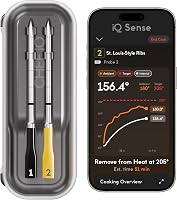
ThermoMaven P2 has a smart display base for live readings and direct target setting, plus an optional app for added features. CHEF iQ Sense pairs with the CHEF iQ app, and its hub provides audio and phone notifications.
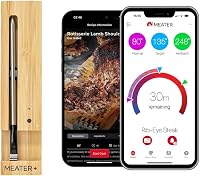
MEATER Pro connects to the MEATER app over Bluetooth. TempPro TempSpike 500 uses the TempPro app for real-time tracking, custom alerts and cooking estimates.
If you want to avoid app dependence, prioritize a clear base display and controls you can use directly. If you want alerts while away from the cooker, compare the app, network requirements and connection method before buying.
Who should skip an app-first thermometer?
Skip an app-first model if you don’t want to pair a phone, keep an app available or rely on a network for the features you use most. Choose a system with a base display and direct controls if you’d rather check temperatures at the cooker.
If you like recipe guidance, phone alerts or remote access, an app may be useful. Check the required phone compatibility and network details before choosing, since setup varies by model.
What should you check about setup and cleaning?
Choose a probe with care instructions that fit your cleanup routine. Dishwasher-safe probes can simplify washing, while a waterproof rating can help when a probe needs thorough cleaning.
CHEF iQ Sense and MEATER Pro specify dishwasher-safe probes. ThermoMaven probes are dishwasher-safe and have an IPX8 waterproof rating, and TempPro TempSpike 500 also has an IPX8-rated waterproof probe.
Setup varies too. TempPro says TempSpike 500 comes Bluetooth paired and does not require an account or WiFi setting.
ThermoMaven requires a 2.4 GHz network for WiFi.
Before cooking, pair the probe, check the app or base, and confirm that alerts reach the place where you’ll be. After cooking, clean the probe according to its care instructions and dry it before storing or charging.
For connection problems, follow our guide to wireless meat thermometers that won’t connect.
Common wireless meat thermometer mistakes
The most common mistake is choosing a connection that doesn’t fit the distance and walls between the cooker and the place you want to monitor from. Test the connection and alert volume in your usual setup before relying on it for a long cook.
Another mistake is comparing the internal food limit with the cooker’s heat and missing the separate ambient limit. Also avoid assuming that every probe is dishwasher-safe, that every model works without a phone, or that a quick charge will cover your whole cook.
Probe placement matters as much as the thermometer’s features. Insert it as directed into the thickest area of the food, away from bone, and don’t let the probe tip touch the cooking surface.
Which wireless meat thermometer fits your priorities?
Choose CHEF iQ Sense for WiFi, two probes and long stated run time; ThermoMaven P2 for a display base and direct target setting; MEATER Pro for Bluetooth app cooking; or TempPro TempSpike 500 for a paired RF and Bluetooth setup. Each choice favors a different routine.
CHEF iQ Sense suits cooks who want two probes, WiFi monitoring, app guidance and up to 50 hours of use. Skip it if you want direct controls on a display base or a setup that doesn’t rely on the app.
ThermoMaven P2 suits cooks who want a base display and WiFi access, with two probes for separate foods. Skip it if you can’t use a 2.4 GHz WiFi network or don’t want to manage network setup.
MEATER Pro suits cooks who want a Bluetooth probe and app-based monitoring across methods that include grilling, roasting, smoking and searing. Skip it if you prefer a dedicated screen or need WiFi remote access.
TempPro TempSpike 500 suits cooks who want a Bluetooth-paired start without account or WiFi setup, with RF and Bluetooth connectivity. Skip it if your cooking method needs an ambient limit higher than 572°F or if you need WiFi monitoring.
If you need a wired option, compare it with wireless vs wired meat thermometers. The right choice is the one that covers your normal cooking distance, probe count, heat exposure and monitoring style.
What to look for in a wireless meat thermometer before you buy
Pick the connection first: WiFi for remote monitoring, Bluetooth or RF for local use, and a display base if you want readings without opening an app. Then confirm the probe count, ambient heat limit and run time against your actual meals.
Choose CHEF iQ Sense for two probes and long run time, ThermoMaven P2 for a screen with WiFi, MEATER Pro for Bluetooth app monitoring, or TempPro TempSpike 500 for paired setup and RF plus Bluetooth. If you’re still deciding how connected the thermometer needs to be, read whether wireless meat thermometers need WiFi.
Frequently asked questions
Do wireless meat thermometers need WiFi?
No. Some wireless meat thermometers use Bluetooth or RF to connect a probe to a base or phone, while WiFi models can send readings through your home network.
Check the connection path and range for the model you are considering, then compare it with the distance and walls between your cooker and where you want to monitor it.
How many probes do I need?
One probe can monitor one piece of meat at a time. Two probes help when you cook separate foods or want different doneness targets, while four can help track multiple cuts or cooker zones.
Choose based on your usual meal size and setup, since extra probes add cost and require storage.
Can a wireless meat thermometer stay in the oven?
Some wireless probes are designed for oven use, but heat limits differ by model and may apply separately to the probe and its ambient sensor. Check both limits and your cooking method before leaving a probe in place, especially near a broiler, direct flame or high-heat sear.
Are wireless meat thermometers accurate?
Accuracy depends on the thermometer and how it is used. Compare the stated accuracy, sensor layout and calibration information, then insert the probe as directed so its sensing area sits in the thickest part of the food.
A temperature reading is only useful when the probe is placed correctly.